Polygon Mask Node
- Category: Masking
- Edition: All editions
- Output type: Mask
- Typical place in a graph: a hand drawn area that limits other masks, effects or spawning to one part of the biome
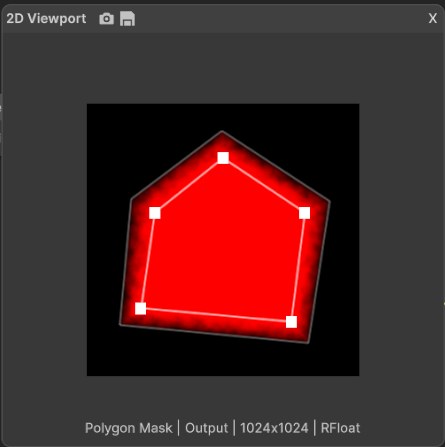
Polygon Mask lets you draw an area by hand. Click points in the 2D view to outline a shape, and the node fills it: full inside, empty outside, with an optional fade band around the edge. Use it when the area comes from your design rather than from the terrain: a town site, a field, a clearing for a quest, a lake bed, or the part of the map where a forest should be.
When to use it
- Mark a designed area: a town, farm fields, a clearing, a battlefield, a lake to dig.
- Limit an effect to one region: multiply it with erosion, a texture or a spawn mask.
- Flatten or raise a hand picked area together with Flatten or Combine.
- Not for: areas that follow the terrain, such as slopes, heights or valleys (use Slope Mask, Height Mask or Geometry Mask); freehand painting with a brush (use Paint Mask); roads and rivers along a line (use Path).
Inputs
| Slot | Type | Required | What to connect |
|---|---|---|---|
| Falloff | Mask | No | A mask, usually a fine Noise, that breaks up the fade band so the edge looks natural instead of a smooth ramp. It only acts inside the fade band, so it does nothing while Falloff is 0. |
Outputs
| Slot | Type | What it holds |
|---|---|---|
| Output | Mask | 1 inside the shape, 0 outside, and a fade from 1 to 0 across the fade band around the edge. With fewer than 3 points, the output is empty. |
Properties
| Property | Default | Range | What it does |
|---|---|---|---|
| Falloff | 0 | 0 to 1, fraction of the biome width | Width of the fade band around the shape. 0 gives a hard edge. 0.1 is a band about 100 m wide on a 1 km biome. The band lies outside the points you placed, so the full area stays the same and the mask grows outward. |
Editing the shape
There is no list of points in the properties: you edit the shape directly in the 2D Viewport while the node is selected.
- Shift + click adds a point. It goes into the side of the outline nearest to where you click.
- Ctrl + click on a point removes it.
- Drag a point to move it.
The outline is drawn in white with a square handle on each point, and the outer edge of the fade band is drawn as a fainter line. The shape always closes from the last point back to the first. Points are stored relative to the biome, so the shape stretches with the biome if you resize it.
Common properties
| Property | What it does |
|---|---|
| Id | The node's unique name in this graph, shown for reference. You cannot edit it. Scripts and the AI workflow CLI use it to find the node. |
| Resolution | How detailed this node's result is, in texels across the biome. The shape is drawn fresh, not read from the Falloff input, so Relative To Main Input (default) and Relative To Graph both follow the biome's Canvas Resolution, times the multiplier below. Absolute sets an exact size. Absolute is limited to 32 to 512 in Vista Personal and 32 to 4096 in Vista Indie and Pro. |
| Split Execution | Lets this node run over several frames so the editor stays responsive during long generations. It only works when Allow Split Execution is on in the graph settings. This node finishes in one step, so splitting only adds a short pause around it; leave it off. |
| Bypass | Skips the node. Nothing comes out, and the nodes after it act as if nothing were connected. |
Examples
All examples use the same five point shape on a 1024 × 1024 m biome, shown over eroded mountains (Noise, Scale 600, then Hydraulic Erosion 2) with a terrain height of 400 m. The 2D view shows the mask from black to red; the 3D view shows it in red over the terrain.
| Setting | 2D | 3D |
|---|---|---|
| Default: Falloff 0 | 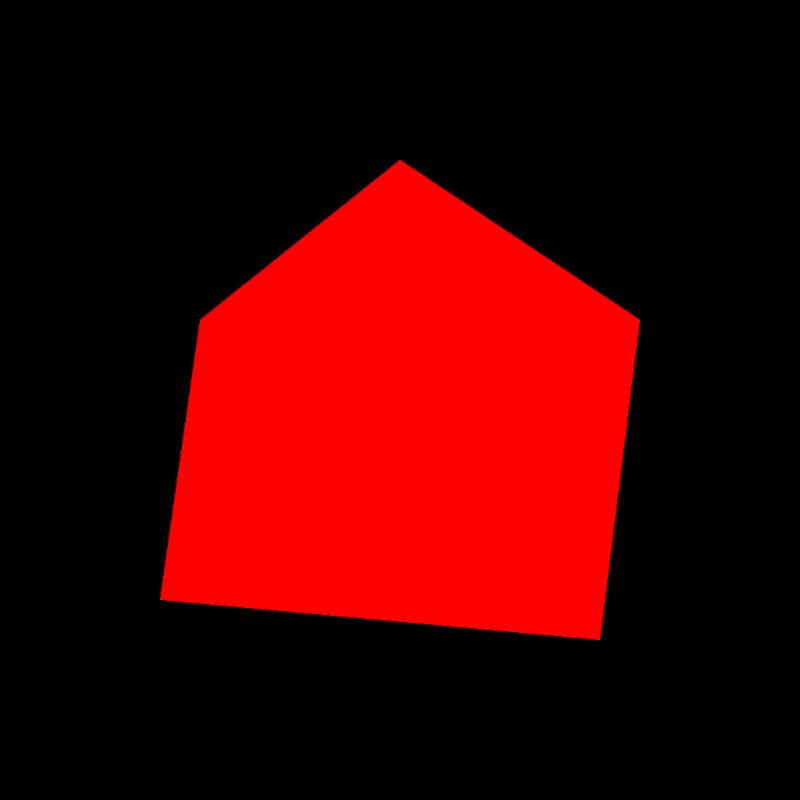 |
 |
| Falloff 0.1 |  |
 |
| Falloff 0.2, with a Noise (Scale 40) in the Falloff input |  |
 |
With no falloff the shape covers 26% of the biome with a hard, straight edge. Falloff 0.1 adds a fade band outside it, and the shape still covers the same 26% at full strength. With a noise in the Falloff input, the band breaks up into patches: the noise lifts some parts of the fade and lowers others, so the edge no longer reads as a drawn line.
Recipes
- Forest only in one region: Polygon Mask (Falloff about 0.05) × the forest mask → Scatter → Tree Output.
- Flat town site: Polygon Mask with a fade → mask input of Flatten, so the terrain levels out inside and blends back at the edge.
- Natural edge: a fine Noise (Scale 30 to 60) → Falloff input, with Falloff at 0.1 or more.
Tip
A drawn shape with a hard edge looks artificial on terrain. Give it some Falloff, and connect a noise to the Falloff input to break up the band.
Warning
Which side the fade band goes on is decided by the corner at the first point. If the first point is an inner corner of the shape (the corner of an L, or a notch in the outline), the band goes inside the shape instead of outside, and the full area shrinks. Start the outline at an outer corner. In the test below, the same L shape gives a band outside when it starts at an outer corner, and a band inside when it starts at the inner one.
| First point on an outer corner | First point on the inner corner |
|---|---|
 |
 |
Note
The fade band is narrower at sharp corners than along straight edges. For an even band, avoid very sharp corners or add a point to round them.
Note
Points are stored as fractions of the biome, not in meters. Resizing the biome stretches the shape with it.
Performance
Very cheap: one quick GPU step for the fill and one for the fade band.
Related nodes
- Paint Mask: paint a mask freehand with a brush.
- Path: masks and shapes along a line, for roads and rivers.
- Flatten: levels the terrain inside a mask.
For AI agents
- Type name:
PolygonMaskNode. Slot ids: Falloff =0(Mask, optional), Output =100(Mask). - Properties for
vista_graphitor_node_set:vertices(array of [x, y] pairs, 0 to 1 of the biome; x along world X, y along world Z; for example[[0.2,0.25],[0.75,0.2],[0.8,0.6],[0.5,0.8],[0.25,0.6]]),falloff(fraction of the biome width; the editor slider is 0 to 1). - Fewer than 3 vertices gives an empty output. Bypass gives no output.
- Falloff band: each vertex is offset by
falloffalong its corner bisector; the side is chosen from the turn at vertex 0, so a reflex vertex 0 sends the band inward. Measured on an L shape: outer corner first, 27% full and 64% empty; inner corner first, 19% full and 73% empty. - Falloff input formula inside the band: f = saturate(lerp(f × map, f + map, f)), where f is the 1 to 0 fade.
- Measured, five point shape: Falloff 0 gives 26% full; Falloff 0.1 keeps 26% full with 44% of the biome above 0.