Splatter 2 Node
- Category: Masking
- Edition: All editions
- Output type: Mask or signed height
- Typical place in a graph: after Scatter, to stamp a shape or a landform at every point: craters, rocks, mounds, sinkholes, patches for textures
Splatter 2 stamps something at every position you give it, each copy with its own size, rotation and strength. The stamp can be a soft disc, any mask, or a height such as a Crater, so it builds anything that comes in many copies: crater fields on a moon, boulder mounds, sinkholes, dune hummocks, or texture patches. By default each new stamp erases what is under it, the way a younger crater wipes out part of an older one, which is what makes a field of overlapping stamps believable.

When to use it
- Crater fields, from a few big impacts to thousands of tiny pits, with Crater as the stamp.
- Scattered landforms: mounds, rock piles, sinkholes, pingos, sand hummocks.
- Texture patches of varied size at scattered spots: lichen, stains, scorch marks.
- Not for: a single crater or landform (use Crater, Volcano or Generic Mountain alone); a one texel mark per point (use Dots); placing objects (use Scatter with an output node).
Inputs
| Slot | Type | Required | What to connect |
|---|---|---|---|
| Positions | Positions | Yes | Where to stamp, usually Scatter with Spread Count 0. Points removed by a density mask are skipped. With nothing connected, nothing is stamped and the output is the Background (or empty). |
| Stamp | Mask | No | What to stamp: any mask, or a signed height such as the Crater Height. It is made at the size of the whole biome and shrunk to each stamp's size. With nothing connected, each stamp is a soft disc, 1 in the middle and fading to 0 at the edge. |
| Rotation | Mask | No | Turns each stamp to an angle between Min Rotation and Max Rotation, picked by the map's value at the stamp's position, instead of a random angle. |
| Scale | Mask | No | Multiplies each stamp's size by the map's value at its position: smaller stamps where the map is dark. |
| Intensity | Mask | No | Multiplies each stamp's strength by the map's value at its position: fainter or shallower stamps where the map is dark. |
| Background | Mask | No | The surface to stamp onto, such as the base height or the output of an earlier Splatter 2. The stamps are drawn over it. With Replace, each stamp also sits on the surface around it, so it follows hills and slopes. |
Outputs
| Slot | Type | What it holds |
|---|---|---|
| Output | Mask (signed) | The stamps over the Background. With a signed stamp, such as a crater, the values can go below 0 where there is no background, and above 1 with Add. With a height stamp, connect a background height, or set the biome's height blend to Raise. |
Properties
Seed
| Property | Default | Range | What it does |
|---|---|---|---|
| Seed | Random | Any integer | Picks each stamp's random size, rotation, strength and jitter. It is combined with the biome's seed. |
Size
| Property | Default | Range | What it does |
|---|---|---|---|
| Min Size | 20 | 0 and up | Size of the smallest stamps. It cannot go above Max Size. |
| Max Size | 400 | Min Size and up | Size of the largest stamps. |
| Size In World Space | On | On, Off | On: sizes and Position Jitter are in meters. Off: they are fractions of the biome width, so 0.1 is a tenth of the biome. |
| Size Bias | 4 | 1 to 10 | How strongly the sizes lean toward Min Size. 1 spreads them evenly between the two; higher values give many small stamps and only a few large ones, as in nature. |
| Position Jitter | 0 | 0 and up, same unit as the sizes | How far each stamp moves at random from its point. Raise it to hide the rows of the Scatter grid; around the spacing of the Scatter works well. |
Rotation
| Property | Default | Range | What it does |
|---|---|---|---|
| Min Rotation, Max Rotation | -180, 180 | Degrees | The range of angles each stamp is turned to, at random, or by the Rotation map if connected. Narrow it, for example to 0 and 0, for stamps that must all face the same way. |
Strength
| Property | Default | Range | What it does |
|---|---|---|---|
| Intensity Multiplier | 1 | 0 and up | Multiplies every stamp's values: deeper craters, taller mounds, stronger mask. |
| Intensity Variation | 0 | 0 to 1 | How much each stamp's strength varies at random. 0 gives all stamps the same strength; 1 lets some fade down to nothing. |
| Strength By Size | 0 | 0 to 1 | How much a stamp's strength follows its size. At 1, a stamp a tenth of the biome wide is a tenth as strong, so a height stamp keeps its exact shape at every size. At 0 every stamp keeps full strength, so small height stamps become steep and spiky. Use 1 for heights such as craters, and 0 for masks. |
| Overlap Mode | Replace | Replace, Add, Max, Min | How stamps combine where they overlap. Replace: each stamp erases what is under it, like a younger crater. Add: stamps stack. Max: the highest value wins, so overlapping masks merge. Min: the lowest wins. |
| Replace Radius | 0.75 | 0 to 1 | Replace only. How far from the center a stamp fully covers what is under it, from 0 (center) to 1 (edge). Beyond it, the stamp fades back into the old surface, which reads as ejecta burying older features. Keep it past a crater's rim. 1 gives clean cut stamps with no fade. |
How Replace works
Stamps are drawn one after another, in a scrambled order so they do not sweep along the rows of the grid. With Replace, each one paints over everything under it out to Replace Radius, then blends back into the old surface by its edge. With a Background connected, each stamp is added to the background smoothed to about the stamp's own size, so a crater on a hillside tilts with the hill but erases the small bumps inside it.
Common properties
| Property | What it does |
|---|---|
| Id | The node's unique name in this graph, shown for reference. You cannot edit it. Scripts and the AI workflow CLI use it to find the node. |
| Resolution | How detailed this node's result is, in texels across the biome. The main input is a set of points, so Relative To Main Input (default) and Relative To Graph both follow the biome's Canvas Resolution, times the multiplier below. Absolute sets an exact size. Stamps only a few texels wide lose their shape; very small craters need a high resolution, such as 2048 for a 2 km biome. Absolute is limited to 32 to 512 in Vista Personal and 32 to 4096 in Vista Indie and Pro. |
| Split Execution | Lets this node run over several frames so the editor stays responsive during long generations. It only works when Allow Split Execution is on in the graph settings. This node finishes in one step, so splitting only adds a short pause around it; leave it off. |
| Bypass | Skips the node. Its main input is a set of points, not a mask, so nothing comes out, and the nodes after it act as if nothing were connected. |
Examples
All examples are on a 1024 × 1024 m biome with a terrain height of 400 m. Seed 128.
Soft discs
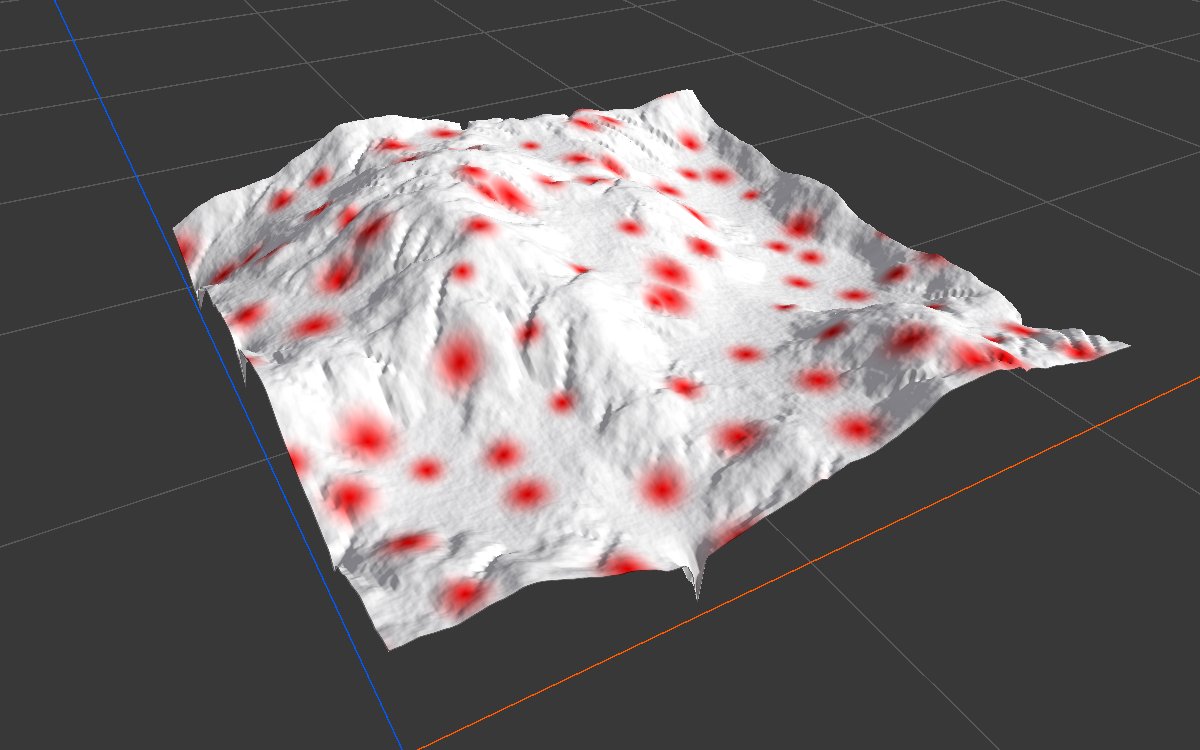
These use the default disc stamp and no background, positions from Scatter with Spacing 120 and Spread Count 0. The 2D view shows the mask from black to red; the 3D view shows it in red over the eroded mountains of the other Masking pages.
| Setting | 2D |
|---|---|
| Default: sizes 20 to 400 m, Size Bias 4, Replace | 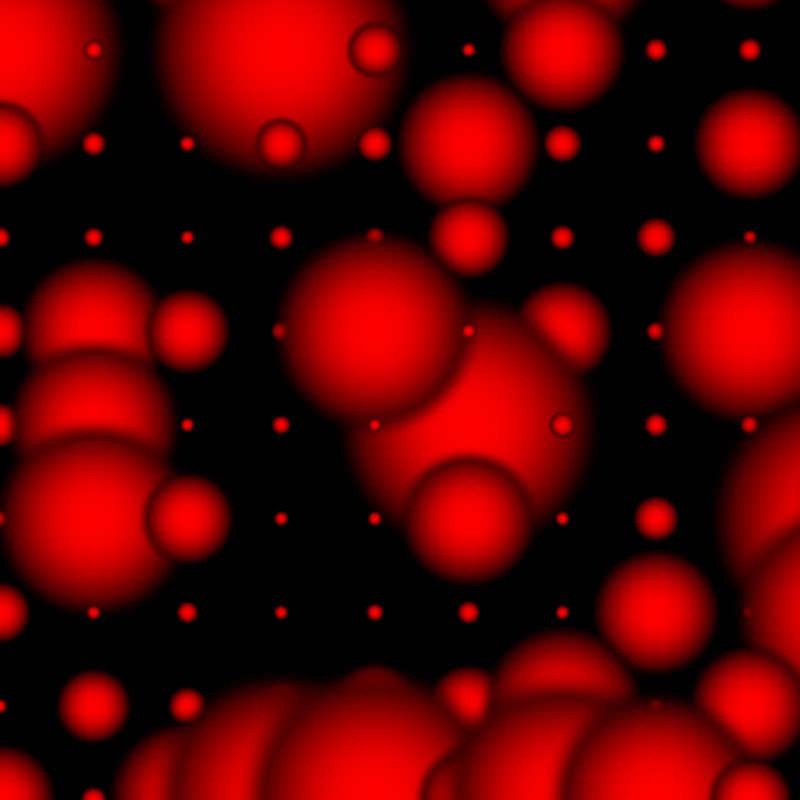 |
| Overlap Mode Max |  |
| Overlap Mode Add | 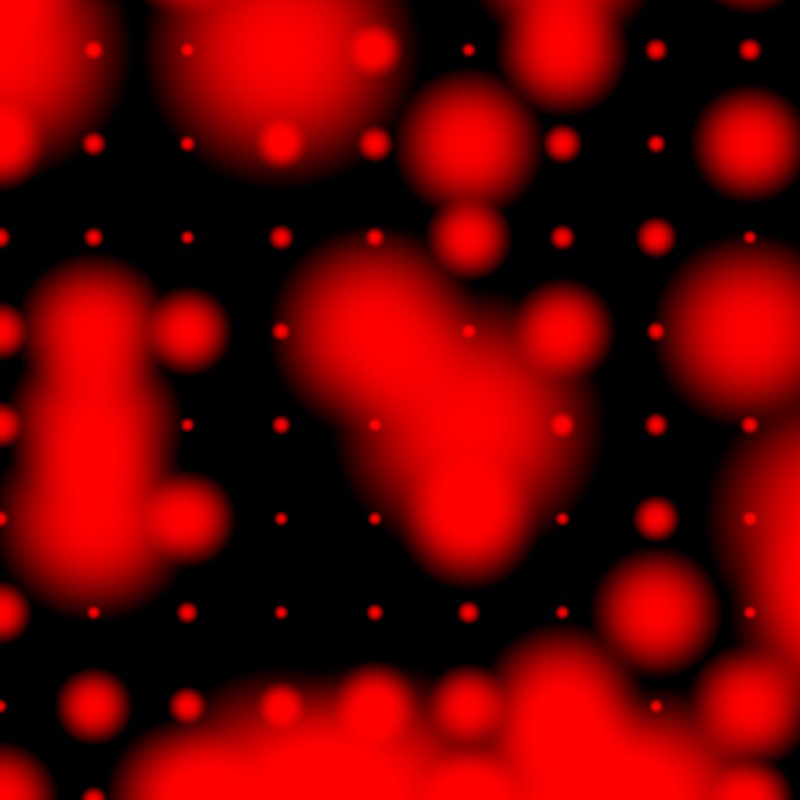 |

With the defaults, most stamps are tiny and a few are large, and the tiny ones still sit in the rows of the Scatter grid, since Position Jitter is 0. Replace shows where small discs land on big ones: each small disc cuts its own fading edge into the larger disc, leaving a dark ring. Max merges overlapping discs instead, the usual choice for masks. Add stacks them, so overlaps go above 1 (up to 1.49 here).
| Setting | 2D | 3D |
|---|---|---|
| Even sizes: sizes 60 to 120 m, Size Bias 1, Position Jitter 50, Max | 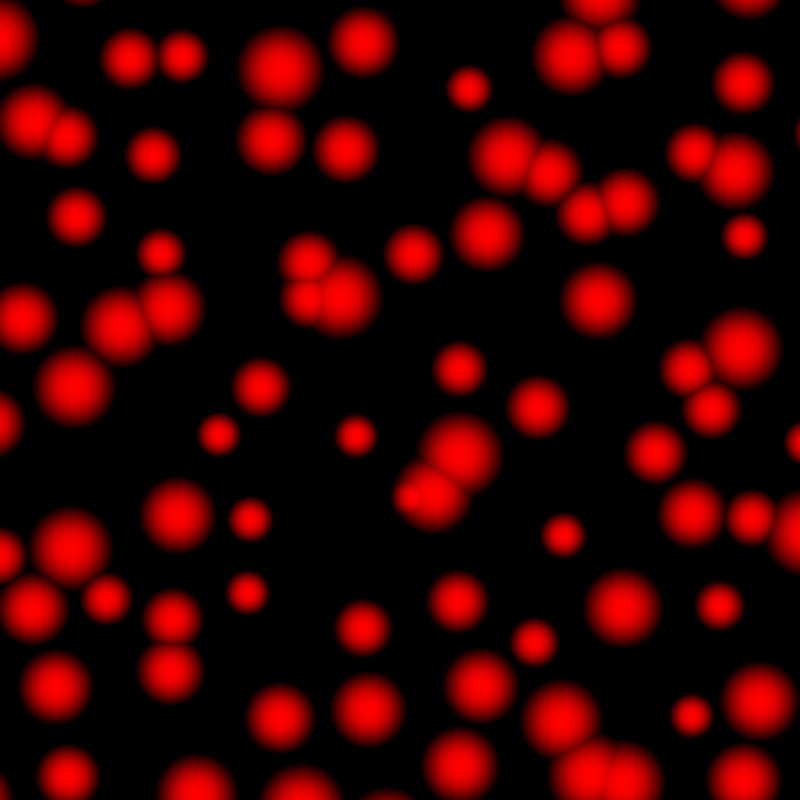 |
 |
| Same, plus Intensity Variation 1 |  |
With Size Bias 1 and a narrow size range, the stamps are all about the same size, and Position Jitter hides the grid. Intensity Variation 1 then gives each a random strength, from full down to almost nothing.
Crater field
The setup of the moon-surface recipe, simplified: a Crater (Rim Height 40, Floor Depth 110, Size 0.9, Rim Size 0.66, no terraces) as the Stamp; gently rolling ground (Noise, Scale 1400, then Levels to 0.32 to 0.46) as the Background; positions from Scatter (Spacing 125, Spread Count 0). Splatter 2 sizes 44 to 283 m, Size Bias 3.5, Position Jitter 90. The 3D view shows the output as the terrain height.
| Strength By Size 1, Replace | Strength By Size 0 |
|---|---|
|
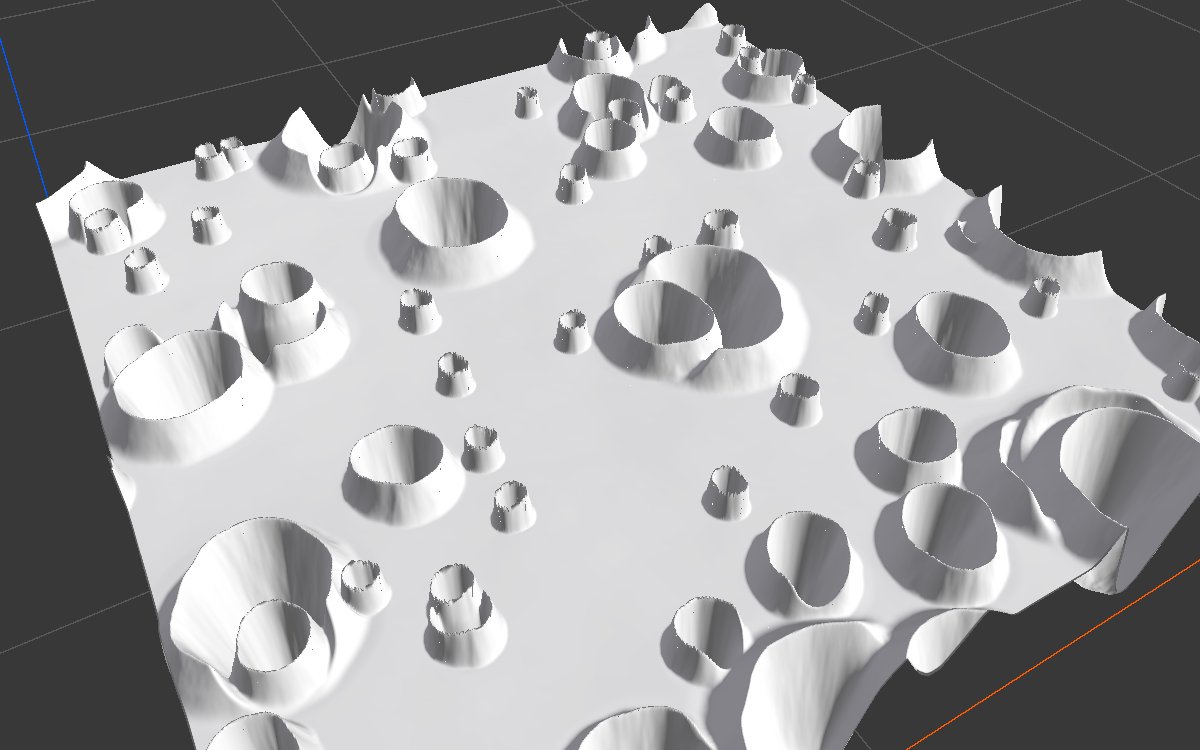 |
| Every crater keeps the shape of the stamp. Where they overlap, the younger crater cuts cleanly into the older one. | Small craters keep the full depth of the stamp, so they turn into steep wells with sharp rims. |
| Strength By Size 1, Add |
|---|
 |
| With Add, overlapping craters stack instead of erasing each other: rims pile up and bowls fill, which reads as lumps rather than as impacts. |
Recipes
- Moon surface: several Splatter 2 nodes in a chain, each taking the previous one as Background, from medium to small to tiny craters, then the biggest craters second to last so their floors stay clean, and a detailed erosion pass over everything. Recipe
moon-surface. - Crater rims for texturing: a second Splatter 2 with the same Positions, Seed and size settings, but the Crater Rim as the stamp and Max overlap. It lands on exactly the same craters and gives a mask of their rims.
- Rock mounds: Scatter → Splatter 2 (disc stamp, Max, Intensity Multiplier for the height) → Combine Add with the base height → erosion.
- Lichen patches: Scatter on a rock mask → Splatter 2 (disc stamp, small sizes, Max, Intensity Variation 0.5) → texture weight.
Warning
Set the Scatter node's Spread Count to 0. Its default adds a cluster of extra points around each base point, so every stamp comes in a clump of 8.
Tip
For height stamps, set Strength By Size to 1. A stamp is made at the size of the biome; at 1 it scales down evenly and keeps its shape, at 0 it keeps its full height at every size and small copies become spikes.
Tip
Order is age with Replace. In a chain of Splatter 2 nodes through Background, each later node is younger and erases the earlier ones where it lands. Put the stamps that should stay intact last.
Note
A crater stamp is signed: below 0 for the bowl. Without a Background, the result dips below 0 and only digs into the terrain if the biome's height blend is set to Raise. Connect the base height as Background to get a complete height.
Note
Small stamps need resolution. A stamp only a few texels wide loses its shape, so tiny craters turn into noise at low resolution.
Performance
Cheap: all stamps are drawn in one GPU step. Cost grows with the number of positions and with the area the stamps cover; tens of thousands of stamps are still quick.
Related nodes
- Crater: the usual height stamp.
- Scatter: makes the positions.
- Dots: marks a single texel per point.
- Splatter: the older version, deprecated.
For AI agents
- Type name:
Splatter2Node. Slot ids: Positions =0(Buffer), Stamp =1, Rotation =2, Scale =3, Intensity =4, Background =5(Masks); Output =100(Mask, RFloat, signed). - Properties for
vista_graphitor_node_set:seed,minSize,maxSize(setter keeps min ≤ max; set max first when raising both),sizeInWorldSpace(bool),sizeBias(≥ 1, editor slider 1 to 10),positionJitter(≥ 0),minRotation,maxRotation(degrees),intensityMultiplier(≥ 0),intensityVariation(0 to 1),strengthBySize(0 to 1),overlapMode(Replace,Add,Max,Min),replaceRadius(0 to 1). - Per stamp: size = lerp(minSize, maxSize, random^sizeBias) (as a fraction of biome width), × Scale map; strength = intensityMultiplier × size^strengthBySize × lerp(1, random, intensityVariation), × Intensity map; rotation random in range or from the Rotation map.
- Default stamp: smoothstep disc, 1 at center to 0 at edge. Replace: alpha 1 to replaceRadius, fades to 0 at the edge; value = stamp × strength + background sampled at the mip about the stamp's size.
- Scatter feeding it:
spreadCount 0. Full worked chain: recipemoon-surface. - Measured, disc stamps over Scatter Spacing 120: Replace mean 0.23; Max mean 0.27; Add peaks at 1.49.
- Bypass gives no output.