Threshold Node
- Category: Adjustments
- Edition: All editions
- Output type: Height / Mask
- Typical place in a graph: on a height or mask, to cut it at a value
Threshold cuts a height or mask at two values. Everything below Low becomes 0, everything above High becomes 1, and values between them pass through unchanged. With Low and High set to the same value, it turns any smooth gradient into a hard black and white selection: land and sea, high ground and low ground, inside and outside.

When to use it
- Make a hard selection from a smooth mask: a coastline from a height, a clear edge for a texture, an area for spawning.
- Remove weak values from a mask and push strong values to full strength, keeping a soft middle.
- Not for: soft edges with a controlled falloff (use Levels or Curve); selecting a band of heights (use Height Mask or Range Select).
Inputs
| Slot | Type | Required | What to connect |
|---|---|---|---|
| Input | Mask | Yes | The height or mask to cut. |
Outputs
| Slot | Type | What it holds |
|---|---|---|
| Output | Mask | 0 below Low, 1 above High, and the input unchanged between them. |
Properties
| Property | Default | Range | What it does |
|---|---|---|---|
| Low | 0 | 0 to 1, up to High | Values below it become 0. |
| High | 1 | 0 to 1, from Low | Values above it become 1. |
| Compare Mode | Exclusive | Exclusive, Inclusive | What happens to values exactly equal to Low or High. Exclusive keeps them as they are; Inclusive sends a value equal to Low to 0 and one equal to High to 1. On real terrain data the difference is almost never visible. |
With the defaults (0 and 1) nothing changes. Set Low and High to the same value for a fully hard cut.
Common properties
| Property | What it does |
|---|---|
| Id | The node's unique name in this graph, shown for reference. You cannot edit it. Scripts and the AI workflow CLI use it to find the node. |
| Resolution | How detailed this node's result is, in texels across the biome. Relative To Main Input (default) matches the texture connected to Input, times the multiplier below it. Relative To Graph follows the biome's Canvas Resolution instead. Absolute sets an exact size. A hard edge is only as smooth as one texel, so a higher resolution gives cleaner outlines. Absolute is limited to 32 to 512 in Vista Personal and 32 to 4096 in Vista Indie and Pro. |
| Split Execution | Lets this node run over several frames so the editor stays responsive during long generations. It only works when Allow Split Execution is on in the graph settings. This node finishes in one step, so splitting only adds a short pause around it; leave it off. |
| Bypass | Skips the node. The input passes through unchanged. |
Examples
Both examples cut the same Noise (Scale 600, Seed 128) on a 1024 × 1024 m biome with a terrain height of 400 m, shown as height in 3D to make the cut visible.
| 2D | 3D | |
|---|---|---|
| Input |  |
 |
| Low 0.3, High 0.5 | 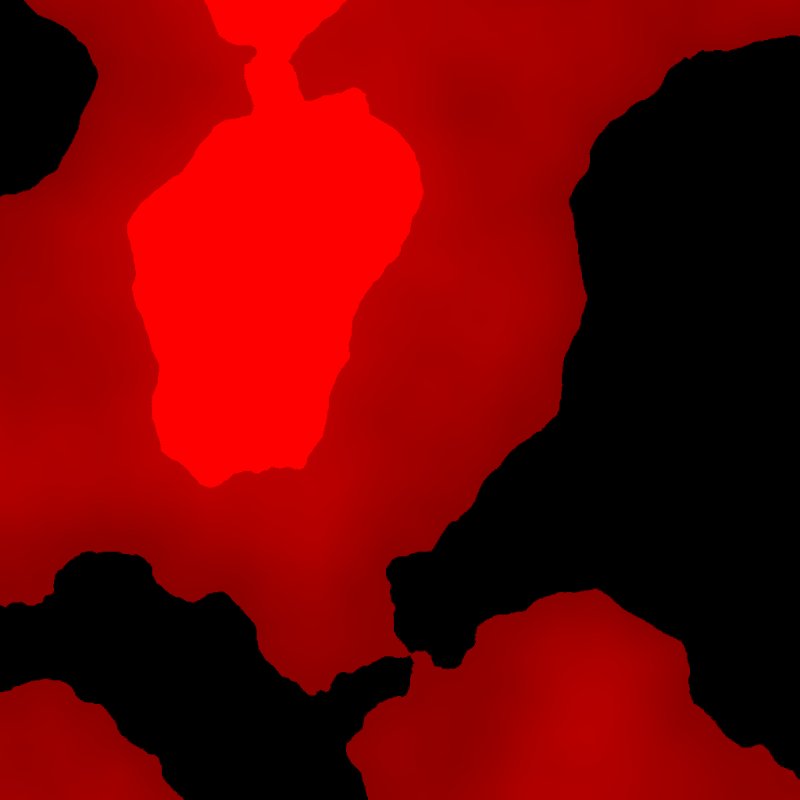 |
 |
| Low 0.35, High 0.35 |  |
|
With a gap between Low and High, the middle band keeps its original values, so cliffs appear at both cut lines. With both at 0.35, the result is a pure selection: about half the biome is 0 and half is 1.
Recipes
- Land and sea mask: height → Threshold (Low = High = sea level as a fraction of the terrain height) → Blur for a soft shoreline.
- Clean spawn area: a soft forest mask → Threshold → Scatter, so trees stop at a clear line.
Note
Threshold does not remap the middle band: values between Low and High keep their original values, so a wide gap leaves a sudden jump at each end. To stretch the middle to 0 to 1, use Levels (In Low and In High) instead.
Performance
Very cheap: one quick GPU step.
Related nodes
- Levels: soft cuts that stretch the middle.
- Clamp: limit values without sending them to 0 or 1.
- Height Mask, Range Select: select bands of values.
For AI agents
- Type name:
ThresholdNode. Input0, Output100. - Properties:
low,high(0 to 1, low ≤ high),compareMode(Exclusive, Inclusive). - Output: v < low → 0; v > high → 1; otherwise v (Inclusive also maps v == low → 0 and v == high → 1).