Blur Node
- Category: Adjustments
- Edition: All editions
- Output type: Height / Mask
- Typical place in a graph: after a detailed shape or mask, before erosion or an output
Blur softens sharp terrain features, rounds creases, and feathers mask edges. Its radius is measured in texels, so the same setting covers more ground when the node runs at a lower resolution.
When to use it
- Round a hard ridge, polygon corner, or distance field crease before it becomes terrain.
- Feather a sharp mask before using it for textures, trees, grass, or another adjustment.
- Widen a thin line such as a crack outline before strengthening it with Levels.
- Remove fine spikes while keeping the large mountain shapes beneath them.
- Make a very wide blur cheaply by lowering Resolution, then restore full resolution with Smooth.
- Not for repeated relaxation over many frames. Use Smooth when you need many progressive passes or a mask that limits where smoothing happens.
Inputs
| Slot | Type | What to connect |
|---|---|---|
| Input | Mask | The terrain shape or mask to soften. Blur spreads each value into the surrounding texels. |
Outputs
| Slot | Type | What it holds |
|---|---|---|
| Output | Mask | The softened result. Sharp ridges and mask boundaries become wider and more gradual. The broad height balance stays similar, but the highest and lowest local values move toward their neighbors. |
Properties
| Property | Default | Range | What it does on the terrain |
|---|---|---|---|
| Radius | 1 | 0 to 100 texels | How far the blur reaches around each texel. 0 passes the input through unchanged. Small values remove fine grain or widen a thin mask. Large values round broad terrain features and soften wide boundaries, but cost more because the whole blur runs in one frame. |
Common properties
| Property | What it does |
|---|---|
| Id | The node's unique name in this graph, shown for reference. You cannot edit it. Scripts and the AI workflow CLI use it to find the node. |
| Resolution | How detailed this node's result is, in texels across the biome. Relative To Main Input (default) matches the input, times the multiplier below it. Relative To Graph follows the biome's Canvas Resolution instead. Absolute sets an exact size. Radius is measured at this resolution: at 0.25 resolution, one texel covers four times as much ground as at full resolution. Absolute is limited to 32 to 512 in Vista Personal and 32 to 4096 in Vista Indie and Pro. |
| Split Execution | Lets a node run over several frames when it supports progressive work. Blur always finishes in one step, so this setting only adds a short pause around it; leave it off. |
| Bypass | Skips Blur and passes Input through unchanged. Use it to compare the sharp source with the softened result. |
Radius and terrain scale
Radius is not a distance in meters. It is a number of texels at the node's output resolution.
On the 1024 meter sample biome at resolution 1024, one texel covers about 1 meter. Radius 10 therefore reaches about 10 meters from each point. At a resolution multiplier of 0.25, the node is 256 texels across, each texel covers about 4 meters, and radius 10 reaches about 40 meters.
This gives you two controls:
- Raise Radius when you want a wider blur at the current detail level.
- Lower Resolution when you want a much wider and cheaper blur and do not need fine detail in the intermediate result.
Examples
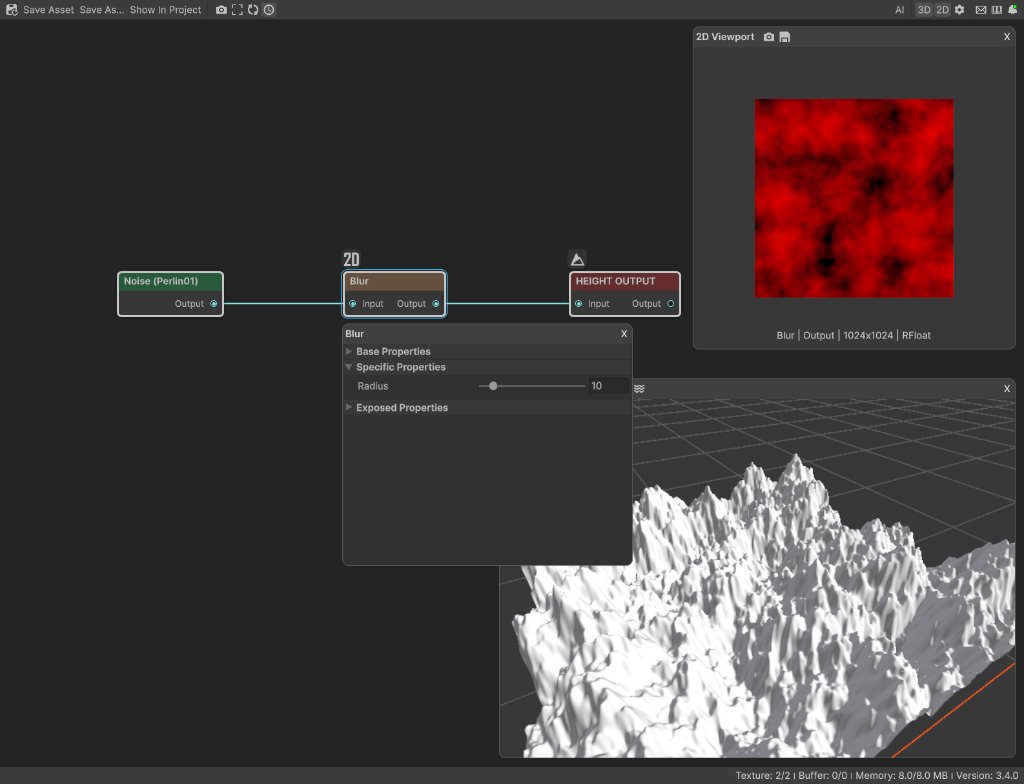
All examples use Noise with Scale 250, Persistence 0.55, and Seed 128, followed by Blur and Height Output. The biome is 1024 by 1024 meters with a terrain height of 400 meters and a canvas resolution of 1024. Only Radius changes.
Radius 1: fine detail stays


Radius 1 only softens the smallest texel sized changes. The source still reads as sharp, noisy terrain. The measured range was about -0.077 to 0.771, with a mean of 0.326.
Radius 10: remove spikes, keep mountains


Radius 10 removes most of the thin spikes and joins nearby bumps into readable ridges. The large mountain layout remains. The range tightened slightly to about -0.058 to 0.747, while the mean stayed at 0.326.
Radius 40: broad rounded masses


Radius 40 removes nearly all small ridges. Separate peaks merge into broad rounded landforms. The range narrowed to about -0.008 to 0.692, and the mean again stayed at 0.326.
Recipes
- Round a polygon landform: Position Distance Field → Blur at 0.25 resolution → Smooth at graph resolution → multiply with a mountain shape. The low resolution Blur removes creases cheaply; Smooth removes blockiness while restoring the final resolution.
- Widen dry cracks: Voronoi Outline → Blur radius 1 → Levels with In Low about 0.05 and In High about 0.35. Blur gives the one texel outline enough width for Levels to shape it.
- Feather a hard mask: mask → Blur radius 5 to 20 → use the result for a texture or population output. Choose the radius by the transition width you need at the current resolution.
Tip
For a wide blur, lower this node to 0.25 resolution before raising Radius. It processes one sixteenth as many texels, and each radius texel covers four times the ground distance.
Tip
Compare the result in 3D. A 2D mask may look pleasantly soft while the terrain has already lost an important ridge or silhouette.
Warning
A large radius at full resolution runs in one frame and can cause a visible editor pause. Use the lower resolution recipe above, or use Smooth when progressive execution matters.
Performance
Blur runs on the GPU in one step. Cost rises with output resolution and Radius. Lowering each dimension to 0.25 processes about one sixteenth as many texels and makes the same radius cover four times the ground distance.
Related nodes
- Smooth: progressive repeated smoothing with an optional area mask.
- Sharpen: strengthens small edges and detail instead of softening them.
- Levels: reshapes the blurred values and can strengthen a widened line or mask.
- Expand: grows a mask boundary without averaging all nearby values.
- Shrink: pulls a mask boundary inward.
For AI agents
- Type name:
BlurNode(vista_graphitor_node_add --type BlurNode). - Slot ids: Input =
0, Output =100. Both are Mask slots. - Property:
radiusis an integer clamped to 0 to 100. Default is 1. - Radius is measured in output texels, not meters. Approximate ground reach is
radius * biomeWidth / outputResolutionmeters. - Blur executes in one step even when Split Execution is on.
- With no input, the node uses black and outputs black. When bypassed, the input passes through unchanged.
- Wide blur recipe: set
resolutionOverridetoRelativeToMainInput,resolutionMultiplierto0.25, then restore graph resolution with a following Smooth node. - Sample graph:
Assets/_DocSamples/NodeGraphs/BlurNode_Doc.asset.