Points Node
- Category: General
- Edition: All editions
- Output type: Positions
- Typical place in a graph: the start of a spawning chain built step by step, before Spread, Offset or Thin Out
Points makes a regular grid of positions across the biome, a set number of meters apart. On its own a grid looks artificial, so it is a starting point: break it up with Spread and Offset, thin it with Thin Out, then send it to an output such as Tree Output. For the usual case, Scatter does all of that in one node.

When to use it
- Build your own placement chain when Scatter does not give enough control.
- Place things in deliberate rows: orchards, vineyards, fence posts, lamp posts, a planted forest.
- A regular set of sample positions for Sample Point or Select Position.
- Not for: natural looking placement in one step (use Scatter).
Outputs
| Slot | Type | What it holds |
|---|---|---|
| Output | Positions | One position at every grid crossing, covering the biome. |
Properties
| Property | Default | Range | What it does |
|---|---|---|---|
| Spacing | 100, 100 | 1 and up, meters | Distance between points along X and along Z. Halving both makes four times as many points. Different values give rows: a small X and large Z make tight rows far apart. |
Where the grid lies
The grid is fixed in the world: its lines fall on multiples of Spacing from the world origin, not from the biome's corner. Two biomes with the same Spacing therefore share one continuous grid, with no seam where they meet. The grid also runs a little past the biome's far edges; those points are skipped by the output nodes, but Transform Points can pull them into view when it shrinks or turns the set.
Common properties
| Property | What it does |
|---|---|
| Id | The node's unique name in this graph, shown for reference. You cannot edit it. Scripts and the AI workflow CLI use it to find the node. |
| Split Execution | Lets this node run over several frames so the editor stays responsive during long generations. It only works when Allow Split Execution is on in the graph settings. This node finishes in one step, so splitting only adds a short pause around it; leave it off. |
| Bypass | Skips the node. It has no input to pass through, so nothing comes out. |
Examples
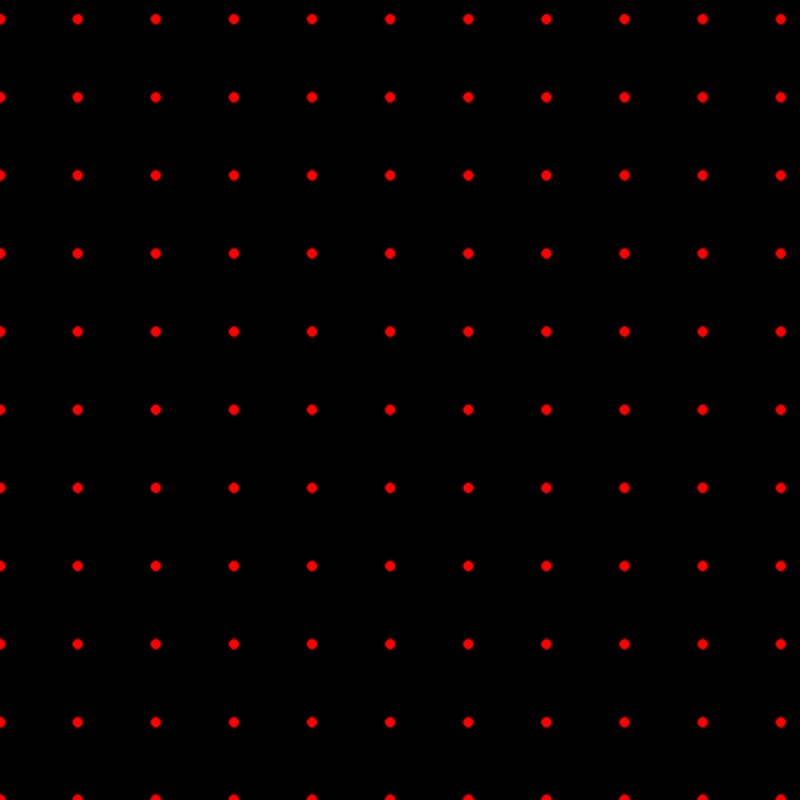
Both examples show the points through Dots and Expand, so each point is a small red disc, on a 1024 × 1024 m biome.
| Spacing 100, 100 | Spacing 50, 150 |
|---|---|
 |
 |
| An even grid, about 11 × 11 points over the biome. | Rows: 50 m between points along X, 150 m between rows along Z. |
Recipes
- Natural placement, step by step: Points → Spread (several points around each) → Offset with a Noise → Thin Out with a density mask → Tree Output. Scatter does the same in one node.
- Orchard rows: Points (Spacing 8, 12) → Thin Out with a field mask from Polygon Mask → Tree Output.
Tip
Even a little randomness hides the grid: an Offset of a quarter of Spacing is often enough.
Warning
The number of points grows fast: a 4 km biome at 2 m spacing is four million points. Check the spacing against the biome size before generating.
Performance
Very cheap: one quick GPU step. The cost is in what the points feed, such as thousands of spawned objects.
Related nodes
- Scatter: grid, spread, randomness and density in one node.
- Spread, Offset, Thin Out, Transform Points: shape the grid.
- Dots: see the points as a mask.
For AI agents
- Type name:
PointsNode. Output slot100(Buffer). No inputs. - Property:
spacing(Vector2, meters, each ≥ 1). - Grid origin: lower left = ceil(bounds.min / spacing) × spacing in world space; dimensions = MultipleOf8(ceil(size / spacing) + 1) per axis, so the buffer holds a few extra points past the far edges, all marked valid. Output nodes skip points outside the biome.
- To see positions:
vista_graphitor_display --as positions --node <id>(pins in 3D), or through Dots and Expand in 2D.