Texture Output Node
- Category: IO
- Edition: All editions
- Output type: Terrain texture weight
- Typical place in a graph: at the end of a texturing chain, one per terrain layer, usually after Weight Blend
Texture Output paints one terrain layer onto the terrain. Pick a Terrain Layer, such as grass or rock, and connect a mask: where the mask is 1 the layer shows fully, where it is 0 it does not show at all. Use one Texture Output per layer. Together, the layers' weights should add up to 1 at every spot, which is what Weight Blend takes care of.

When to use it
- Texture the terrain: grass, rock, sand, snow, dirt, each from its own mask.
- Not for: a single color texture across the terrain for Polaris or custom terrain shaders (use Albedo Output); a layer that a terrain tool should let users swap (use Texture Slot Output).
Inputs
| Slot | Type | Required | What to connect |
|---|---|---|---|
| Input | Mask | Yes | Where the layer shows: 1 fully, 0 not at all. Usually one output of Weight Blend. Values outside 0 to 1 are cut to that range. With nothing connected, the weight is 0 everywhere. |
Outputs
| Slot | Type | What it holds |
|---|---|---|
| Output | Mask | The weight as sent to the terrain, from 0 to 1. You rarely need it; the layer reaches the terrain without connecting anything here. |
Properties
| Property | Default | Range | What it does |
|---|---|---|---|
| Terrain Layer | None | A Terrain Layer asset | The layer to paint: its textures, tiling and material settings come from the asset. Without a layer, the node is skipped. The node shows a preview of the layer's texture. |
| Order | 0 | Any integer | Position of this layer in the terrain's layer list, lowest first. Matters for terrain shaders with settings per layer slot. Layers with the same order keep the order of the nodes in the graph. |
A Browse terrain textures link under the properties opens a page of terrain texture assets.
Common properties
| Property | What it does |
|---|---|
| Id | The node's unique name in this graph, shown for reference. You cannot edit it. Scripts and the AI workflow CLI use it to find the node. |
| Resolution | How detailed this node's result is, in texels across the biome. Relative To Main Input (default) matches the mask connected to Input, times the multiplier below it. Relative To Graph follows the biome's Canvas Resolution instead. Absolute sets an exact size. The terrain then uses its own texture resolution, set on the Vista Manager. Absolute is limited to 32 to 512 in Vista Personal and 32 to 4096 in Vista Indie and Pro. |
| Split Execution | Lets this node run over several frames so the editor stays responsive during long generations. It only works when Allow Split Execution is on in the graph settings. This node finishes in one step, so splitting only adds a short pause around it; leave it off. |
Output nodes cannot be bypassed.
How it works
Each Texture Output gives the weight of one layer. When the biome generates, all of them are packed into the terrain's texture maps, four layers per map, sorted by Order. If two Texture Outputs use the same Terrain Layer, their weights are added together into that one layer.
The terrain shows, at every spot, each layer times its weight, all added up. So the weights must add up to 1: below 1 the ground gets darker, down to black where every weight is 0, and above 1 it gets washed out and too bright. Weight Blend stacks layers so they always add up to exactly 1.
Examples
All examples use the same graph and the same Scene view camera: a Noise height (Scale 600) on a 1024 × 1024 m biome with the Vista Manager's Max Height at 400 m. A Slope Mask (30 to 90 degrees, on a lightly blurred height) marks the steep ground for rock.
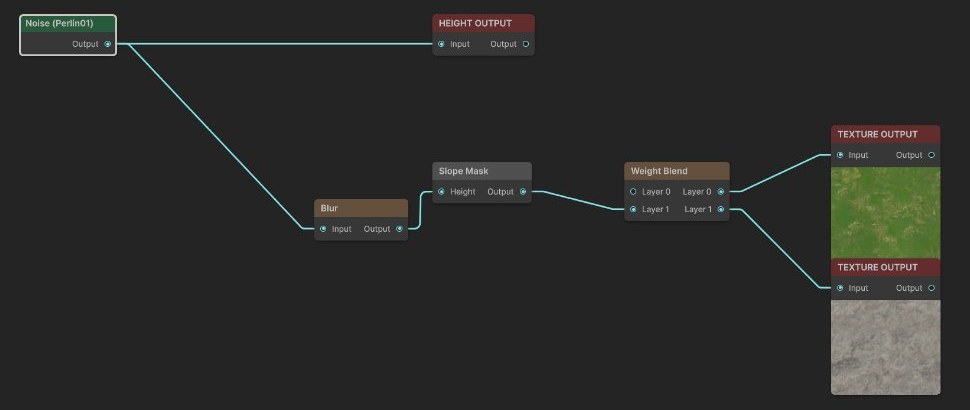
Grass and rock with Weight Blend

Weight Blend with 2 layers: Layer 0 is left empty, so it is the base that covers everything, and the Slope Mask goes into Layer 1. Output Layer 0 goes to the grass Texture Output (Order 0), output Layer 1 to the rock one (Order 1). Rock shows on the steep slopes and grass everywhere else, and the weights add up to 1 everywhere.
What goes wrong without Weight Blend
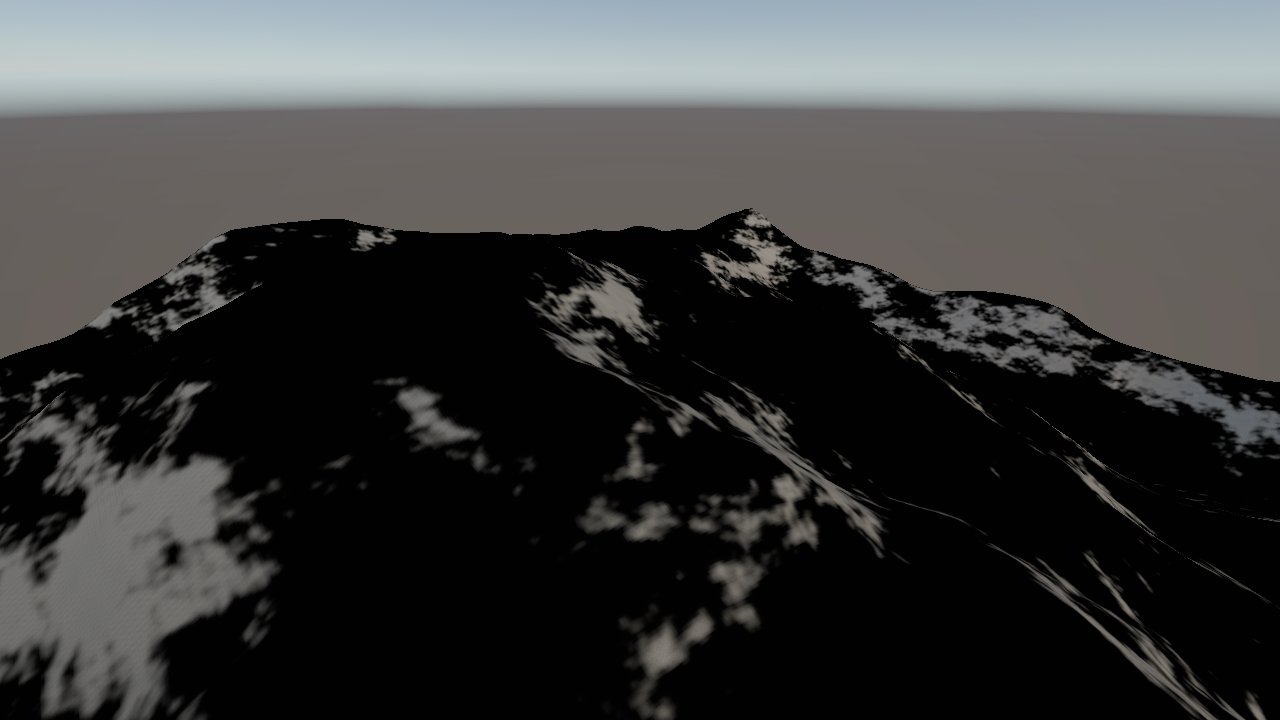
| Weights below 1: no grass weight | Weights above 1: full grass under the rock |
|---|---|
 |
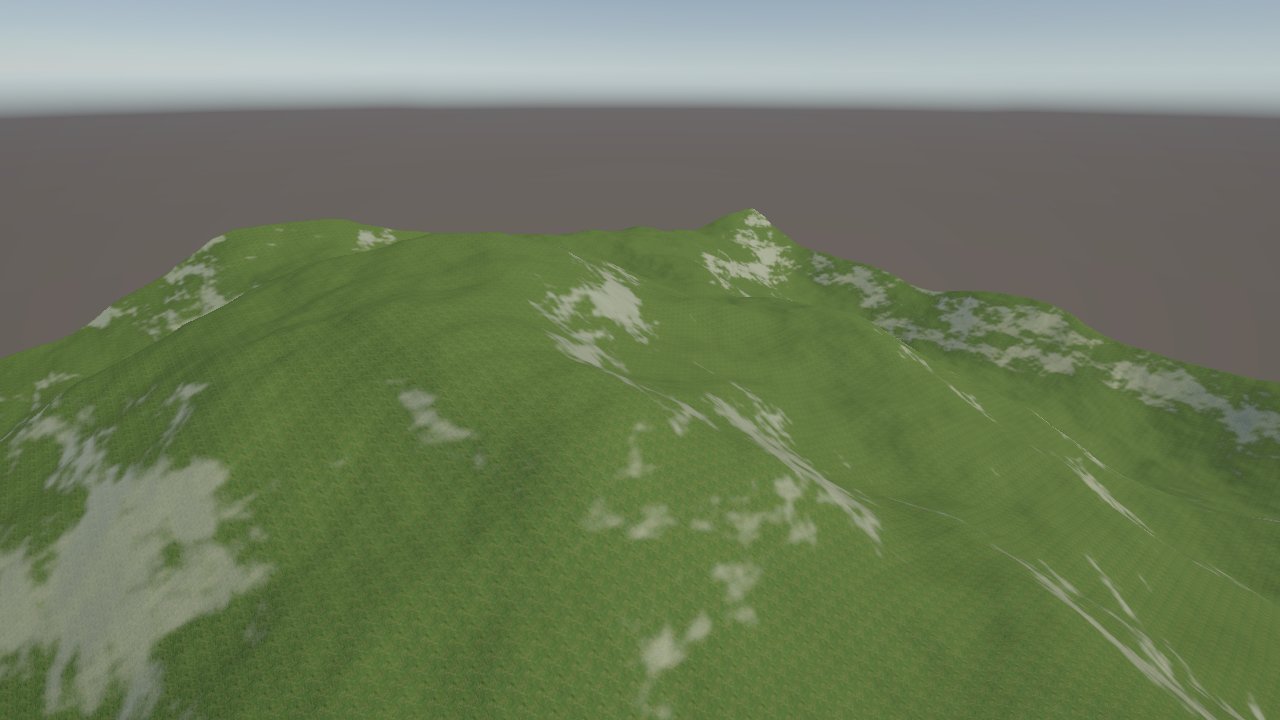 |
| With the grass Texture Output disconnected, only the rock has weight. Everywhere else the weights add up to 0 and the ground renders black. | With grass at full weight everywhere and the Slope Mask straight into the rock, the two add up to 2 on the steep slopes, which look pale and too bright. |
Recipes
- Grass and rock: Slope Mask → Weight Blend Layer 1 (Layer 0 left empty) → two Texture Outputs, grass from Layer 0 and rock from Layer 1. Recipe
mountain-texturing-layerscovers a full set of layers. - Four layers: Weight Blend with 4 layers, in the order things cover each other: base soil, then sediment, then grass, then rock on top.
- Variation inside one material: two layers of grass, light and dark, split by a Noise through Weight Blend.
Warning
The layer weights must add up to 1 at every spot. Where they add up to less, the terrain gets darker, black at 0; where they add up to more, it gets washed out. Send all layers through Weight Blend.
Tip
Take texture masks from the final height, after erosion, and smooth the height lightly (a Blur of radius 1 to 4) before measuring slope. Small bumps in the height otherwise show up as speckled or blocky texture patches.
Note
A Texture Output without a Terrain Layer is ignored. Two Texture Outputs with the same layer add their weights into that layer.
Note
Unity terrain shaders handle a limited number of layers efficiently, often 4 or 8 per pass. Each extra group of 4 layers costs another texture map and more rendering time.
Performance
Very cheap: one quick GPU step per layer. The rendering cost on the terrain grows with the number of distinct layers.
Related nodes
- Weight Blend: makes layer weights that add up to 1.
- Texture Slot Output: a texture layer that terrain tools can let users swap.
- Slope Mask, Height Mask, Geometry Mask: the usual masks for texturing.
- Albedo Output: a color texture for Polaris and custom terrain shaders.
For AI agents
- Type name:
TextureOutputNode. Slot ids: Input =0(Mask), Output =100(Mask). - Properties for
vista_graphitor_node_set:terrainLayer(asset path of a .terrainlayer),order(int). - Input is clamped to 0 to 1. Nodes with no terrainLayer are dropped. Nodes are sorted by
order; distinct layers are packed 4 per alphamap; duplicate layers are summed (clamped at 1). - Not bypassable. Skipped when the biome's Data Mask excludes LayerWeightMaps.
- The weights are not normalized: sums below 1 render dark (black at 0), above 1 overbright. Use
WeightBlendNode(leave Layer 0 empty as the base). - Measured: terrain alphamap mean for rock 0.179 against the graph's 0.18, so the terrain gets the weight as is.