Object Output Node
- Category: IO
- Edition: All editions
- Output type: Prefab instances on the terrain
- Typical place in a graph: at the end of a spawning chain, after Scatter
Object Output places copies of a prefab on the terrain as separate GameObjects: rocks, boulders, ruins, logs, fences, buildings, anything that is not a terrain tree or grass. Give it positions, usually from Scatter, and an Object Template that says which prefab to use. Optional masks thin the objects out and vary their size and rotation. Use one Object Output per kind of object.
When to use it
- Rocks, boulders, stumps, logs, ruins, props: objects with their own colliders, scripts or LOD groups.
- Objects that must follow the slope, with Align To Normal in the template.
- Not for: trees that should render as terrain trees (use Tree Output, much cheaper in large numbers); grass and small plants (use Detail Density Output).
Inputs
| Slot | Type | Required | What to connect |
|---|---|---|---|
| Positions | Positions | Yes | Where to place each object, usually Scatter. Points outside the biome are skipped. With nothing connected, nothing is placed. |
| Density | Mask | No | Thins the objects out: its brightness, times Density Multiplier, is the chance each position keeps its object. Usually you shape density before Scatter instead. |
| Vertical Scale | Mask | No | The height of each object, times Vertical Scale Multiplier. 1 is the prefab's own size. |
| Horizontal Scale | Mask | No | The width and depth of each object, times Horizontal Scale Multiplier. Connect the same mask as Vertical Scale to resize evenly. |
| Rotation Y | Mask | No | Turns each object around its vertical axis, between Min Rotation and Max Rotation. Without it, every object gets the same rotation. |
Outputs
| Slot | Type | What it holds |
|---|---|---|
| Output | Positions | The placed objects with their size and rotation. You rarely need it; the objects reach the scene without connecting anything here. |
Properties
| Property | Default | Range | What it does |
|---|---|---|---|
| Object Template | None | An Object Template asset | The object to place. An Object Template holds the prefab and whether it aligns to the slope (Align To Normal, with a Normal Alignment Error to vary the tilt). Create one with Assets > Create > Vista > Object Template. Without a template, nothing is placed. |
| Density Multiplier | 1 | 0 and up | Scales the chance that each position keeps its object. Without a Density mask, it is the chance alone. |
| Vertical Scale Multiplier | 1 | 0 and up | Object height relative to the prefab, times the Vertical Scale mask if connected. |
| Horizontal Scale Multiplier | 1 | 0 and up | Object width and depth relative to the prefab, times the Horizontal Scale mask if connected. |
| Min Rotation, Max Rotation | -360, 360 | -360 to 360 | The rotation range, picked by the Rotation Y mask. |
| Rotation Multiplier | 1 | 0 and up | Scales the Rotation Y mask before it picks a rotation. |
| Seed | 0 | Any integer | Changes which positions the Density mask removes. It is combined with the biome's seed. |
Common properties
| Property | What it does |
|---|---|
| Id | The node's unique name in this graph, shown for reference. You cannot edit it. Scripts and the AI workflow CLI use it to find the node. |
| Split Execution | Lets this node run over several frames so the editor stays responsive during long generations. It only works when Allow Split Execution is on in the graph settings. This node finishes in one step, so splitting only adds a short pause around it; leave it off. |
Output nodes cannot be bypassed.
How it works
When the biome generates, each terrain tile gets a child object named ~VistaSpawnerRoot, with one group per template (named ~ plus the template's name), and every placed object is spawned into it as a prefab instance. Objects sit on the terrain's surface at their position, with the prefab's own scale times the scale masks. The Vista Manager's Object Per Frame sets how many are spawned each frame, so large counts do not freeze the editor.
Example
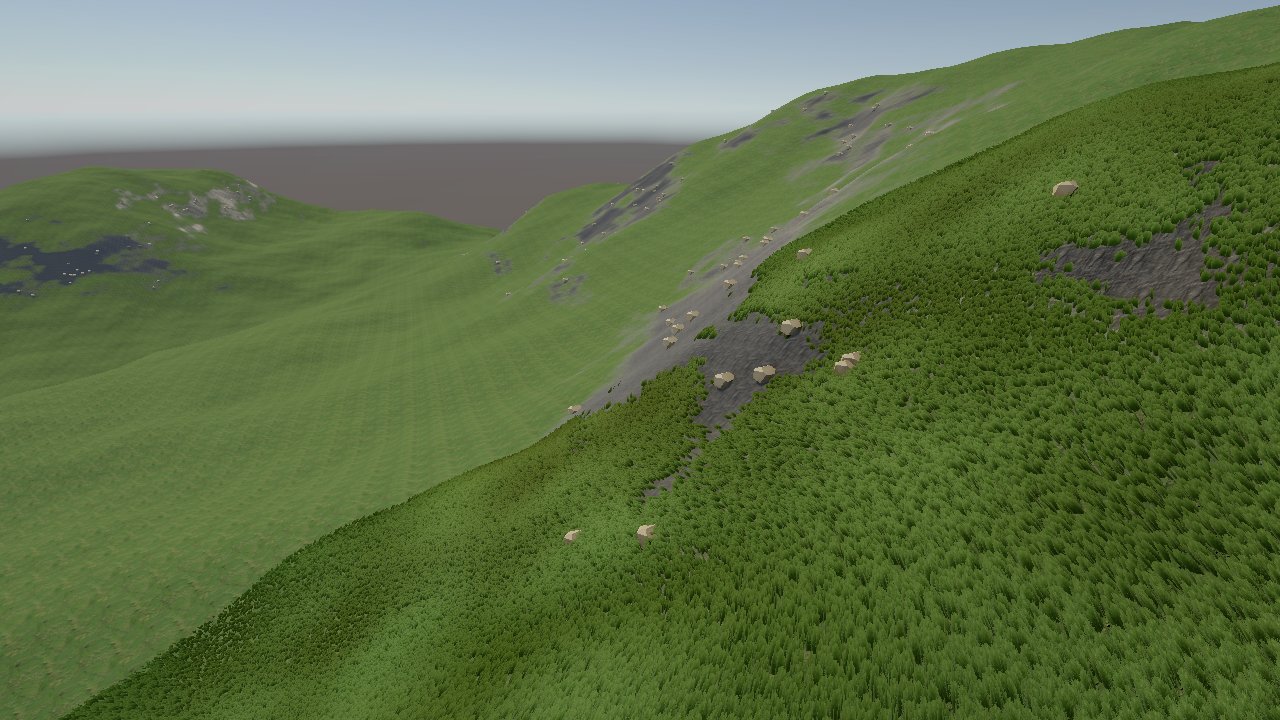
Small rocks from the Vista samples, scaled up 5 times into boulders (Vertical Scale Multiplier and Horizontal Scale Multiplier 5), placed by Scatter (Spacing 30) on a Slope Mask of the steep ground. The grass is a Detail Density Output on the gentle ground. The image at the top of the page shows the result: the boulders follow the steep, rocky band, with a few strays where the slope mask fades out.
Recipes
- Boulders on rocky slopes: Slope Mask (steep) → Scatter → Object Output, with a Noise on both scale inputs for varied sizes.
- Varied rotation: a Noise with a small Scale → Rotation Y, Min Rotation -180, Max Rotation 180.
- No grass under the rocks: the same positions → Dots → Expand → invert → multiply into the grass mask.
Warning
Every generation deletes ~VistaSpawnerRoot and spawns everything again. Changes you make by hand to spawned objects are lost on the next generation. Place hand made objects outside that root.
Note
An Object Template has a Variants list, but Object Output currently places only the main Prefab. For several kinds of object, use several Object Output nodes.
Note
Without a Rotation Y mask, all objects face the same way. Connect a fine Noise for natural variety.
Warning
Each object is a full GameObject. Thousands of them cost memory, generation time and rendering. Check how many points Scatter makes, and use Tree Output for vegetation in large numbers.
Performance
The node itself is a single quick GPU step. Spawning the GameObjects at the end of generation takes most of the time, spread over frames by Object Per Frame.
Related nodes
- Scatter: makes the positions.
- Tree Output: terrain trees, far cheaper in large numbers.
- Detail Density Output: grass and small plants.
For AI agents
- Type name:
ObjectOutputNode. Slot ids: Positions =0(Buffer), Density =1, Vertical Scale =2, Horizontal Scale =3, Rotation Y =4(Masks); Output =100(Buffer). - Properties for
vista_graphitor_node_set:objectTemplate(asset path),densityMultiplier,verticalScaleMultiplier,horizontalScaleMultiplier(≥ 0),minRotation,maxRotation,rotationMultiplier,seed. - Same per instance rules as
TreeOutputNode(keep chance, scale, rotation). Spawned under<terrain>/~VistaSpawnerRoot/~<template name>; the root is destroyed and rebuilt on each generation. Onlytemplate.prefabis used;alignToNormaltilts to the terrain normal. - Not bypassable. Skipped without a valid template or when the biome's Data Mask excludes ObjectInstances.