Height Output Node
- Category: IO
- Edition: All editions
- Output type: Terrain height
- Typical place in a graph: the end of the height chain, after erosion and any final adjustments
Height Output sends the finished height to the terrain. Whatever you connect to it becomes the shape of the land when the biome generates: 0 is the terrain's floor and 1 its top, the Vista Manager's Max Height. Every graph that shapes land needs exactly one.

When to use it
- At the end of every graph that should change the terrain's shape.
- Not for: textures (use Texture Output); holes (use Hole Output); passing a height to another graph (use Output).
Inputs
| Slot | Type | Required | What to connect |
|---|---|---|---|
| Input | Mask | Yes | The final height, from 0 (the terrain's floor) to 1 (the Vista Manager's Max Height). With nothing connected, the height is 0 everywhere: flat ground at the floor. |
Outputs
| Slot | Type | What it holds |
|---|---|---|
| Output | Mask | The height as sent to the terrain, kept between -1 and 1. You rarely need it; the height reaches the terrain without connecting anything here. |
Properties
Height Output has no properties of its own.
Common properties
| Property | What it does |
|---|---|
| Id | The node's unique name in this graph, shown for reference. You cannot edit it. Scripts and the AI workflow CLI use it to find the node. |
| Split Execution | Lets this node run over several frames so the editor stays responsive during long generations. It only works when Allow Split Execution is on in the graph settings. This node finishes in one step, so splitting only adds a short pause around it; leave it off. |
Height Output has no Resolution setting: it always works at the biome's Canvas Resolution. Output nodes cannot be bypassed.
How it works
The connected height is read texel by texel at the biome's Canvas Resolution, kept between -1 and 1, and handed to the biome. The biome then blends it into the terrain with its Height Map blend mode:
| Blend mode | What the height does |
|---|---|
| Replace | Becomes the terrain's height inside the biome. The usual choice for a biome that builds the ground itself. |
| Raise | Is added to the terrain below. Use it for a biome that adds features, such as craters or mounds, on top of another; values below 0 dig in. |
| Lower | Is subtracted from the terrain below. |
| Keep Higher, Keep Lower | The higher, or lower, of the two heights wins. |
The terrain itself cannot go above its top, so any height above 1 is cut flat at the Vista Manager's Max Height.
Examples
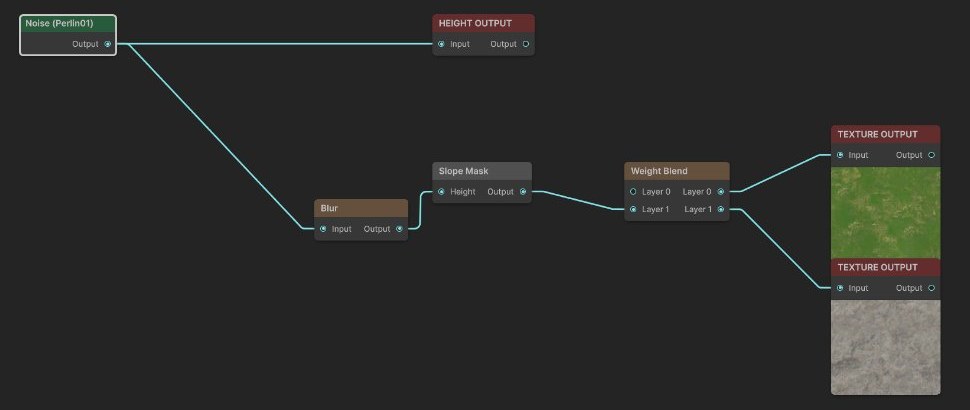
Both examples are the generated terrain in the Scene view: a Noise (Scale 600) on a 1024 × 1024 m biome with the Vista Manager's Max Height at 400 m, textured grass and rock by slope as on the Texture Output page.
| Height from 0 to 1 | Height stretched to 0 to 1.5 |
|---|---|
|
 |
| The Noise stays between 0 and 1, so the land fits under the 400 m top. | A Remap stretches the same Noise to 0 to 1.5. Everything above 1 is cut off at 400 m, which leaves a flat plateau with a sharp edge where the summit was. |
Recipes
- Basic biome: base shape → erosion → Height Output, and textures and spawning taken from the same final height.
- Features on top of another biome: a graph whose height is 0 except for the features, such as craters, with the biome's Height Map blend set to Raise.
Warning
Heights above 1 are cut flat at the terrain's top. If peaks look sliced off, lower the height with Levels or Remap, or raise the Vista Manager's Max Height. Generators such as Volcano take their heights in meters, so check them against Max Height too.
Note
Only one Height Output counts per graph. If a graph has several, only one is used, so keep exactly one.
Note
The same height values give a taller or flatter terrain when you change the Vista Manager's Max Height, since 1 always means the top.
Tip
Take every mask for texturing and spawning from the same height you send to Height Output, after the last erosion. Masks taken from an earlier height do not line up with the final land.
Performance
Very cheap: one quick GPU step. The cost of a graph lies in the nodes before it.
Related nodes
- Texture Output, Hole Output: the other terrain outputs.
- Output: passes a result out of the graph by name, for other graphs and tools.
- Levels, Remap: fit the height into 0 to 1.
For AI agents
- Type name:
HeightOutputNode. Slot ids: Input =0(Mask), Output =10(Mask; note 10, not 100). - No properties. Not bypassable. No resolution override: always the graph's base resolution, RFloat, point sampled, clamped to -1 to 1.
- One per graph: the runtime takes the first
HeightOutputNodeit finds. It is skipped when the biome's Data Mask excludes HeightMap. - 1 = Vista Manager terrainMaxHeight; above 1 is cut flat on the terrain. Negative values only matter with the biome height blend Raise or Lower.
- Check the result in the scene after
vista_graphitor_saveandvista_generation_status;vista_generation_startforces a regeneration when a save reports "unchanged".