Children Tiles
A tile is a terrain GameObject assigned to a Vista Manager. During generation, the Manager sends the combined biome output to each of its tiles.
Tiles can use any terrain backend supported by the current Vista installation. They don't need to be children of the Manager in the Hierarchy.
Create and assign a terrain grid
The simplest way to create tiles is through Window > Vista > Wizard > Create in Scene > Create Terrain. Tiles created there are assigned to the selected Vista Manager automatically.
Add existing terrains
To assign an existing terrain:
- Select the Vista Manager.
- In Add Tile, drag the terrain GameObject into Drop Terrain Game Objects here.
You can drag several terrain GameObjects at once. To collect all terrains of a supported backend from the scene, select its Add All button instead.
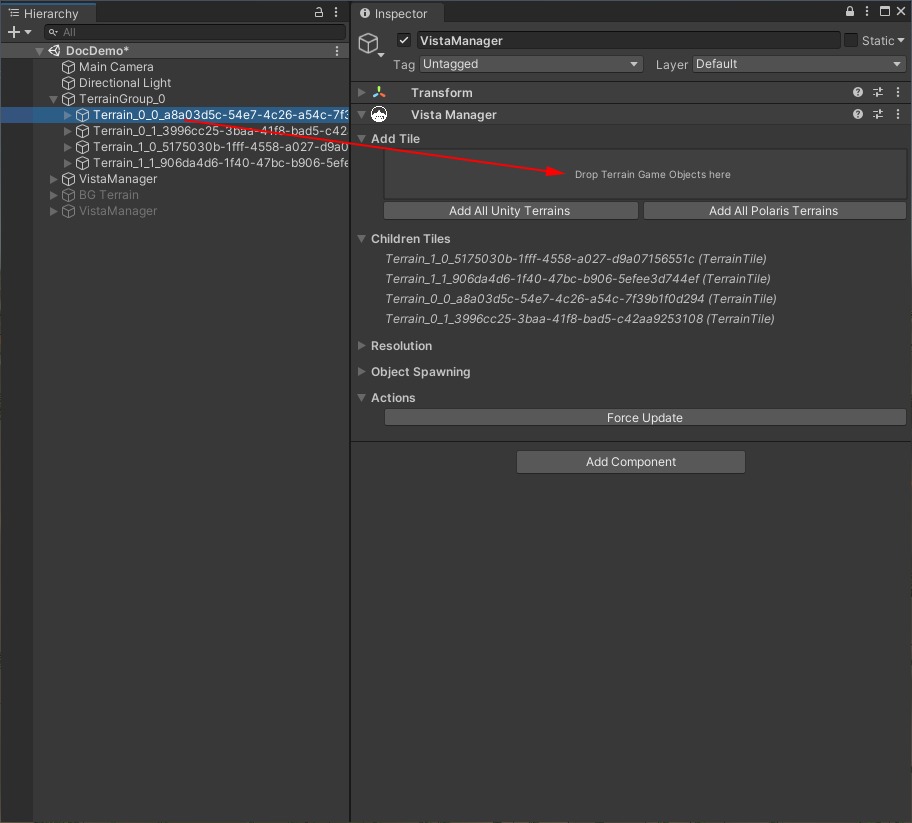
Vista adds the component it needs to associate each terrain with the Manager.

Inspect assigned tiles
Assigned terrains appear under Children Tiles. Select a tile name to highlight its GameObject in the Hierarchy.
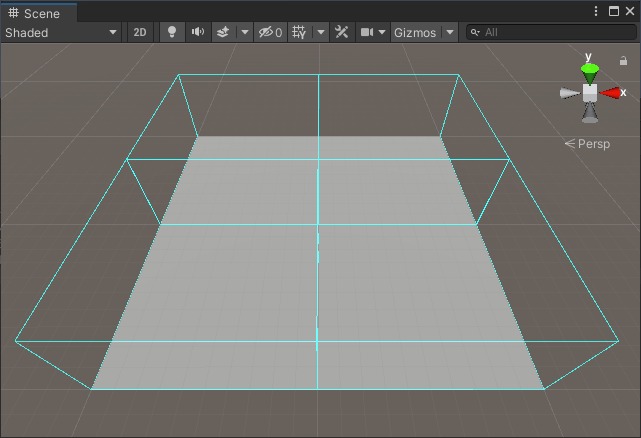
When the Vista Manager is selected, the Scene view outlines the bounds of its terrain tiles.
Remove a tile
To stop a terrain from participating in this Manager's generation, remove its Vista terrain-tile component from the terrain GameObject.
This removes the Vista Manager association; it doesn't delete the terrain GameObject.