Default Value Node
- Category: General
- Edition: All editions
- Output type: Mask, color texture, or positions
- Typical place in a graph: after an optional Input or branch, before the data is required downstream
Default Value uses Input when it contains a valid mask, color texture, or position buffer. If that resource is missing, the node uses Default Value instead. This keeps a graph working when an external or optional input is not supplied.

When to use it
- Give an external Input node a procedural fallback so the graph previews and runs on its own.
- Let a sub graph accept optional data while retaining a dependable internal result.
- Use a backup position set when code or an earlier graph does not supply one.
- Use one graph in several contexts where some callers provide a mask and others do not.
- Not for choosing between black and white pixels. A connected black texture is valid and does not trigger the fallback.
- Not for blending both sources. The node selects one complete resource; use Combine to mix mask values.
Inputs
| Slot | Type | Required | What to connect |
|---|---|---|---|
| Input | Selected Slot Type | No | The preferred mask, color texture, or position buffer. If the resource exists, it always wins, even when every texture pixel is black or a buffer contains no points. |
| Default Value | Selected Slot Type | No | The fallback used only when Input has no texture or buffer resource. If both sources are missing, Output is invalid. |
Outputs
| Slot | Type | What it holds |
|---|---|---|
| Output | Selected Slot Type | The same resource as Input when it is valid; otherwise the resource connected to Default Value. The node links the chosen data without changing its values. |
Properties
| Property | Default | Options | What it does |
|---|---|---|---|
| Slot Type | Mask | Mask, Color Texture, Buffer | Sets the data type for Input, Default Value, and Output. Buffer carries positions. Changing the type rebuilds all three slots and removes incompatible connections. |
Common properties
| Property | What it does |
|---|---|
| Id | The node's unique name in this graph, shown for reference. You cannot edit it. Scripts and the AI workflow CLI use it to find the node. |
| Split Execution | Lets this node run over several frames when Allow Split Execution is on in the graph settings. Default Value only selects and links one resource, so splitting adds a short pause around it; leave it off. |
| Bypass | Skips the fallback check and attempts to pass Input to Output. If Input is missing, Output reads as empty or black even when Default Value is connected. |
How selection works
Default Value tests whether Input has an actual texture or buffer object. It does not inspect the contents of that resource.
- If Input has a valid resource, link it to Output.
- Otherwise, test Default Value and link that resource to Output.
- If both are missing, make Output invalid.
This distinction matters for masks. A black mask still exists, so it is selected over the fallback. For positions, an allocated buffer with zero points is also a supplied resource, not a missing one.
Default Value does not copy or recalculate the selected image or buffer. A downstream node receives the same resource that arrived at the chosen slot.
Examples
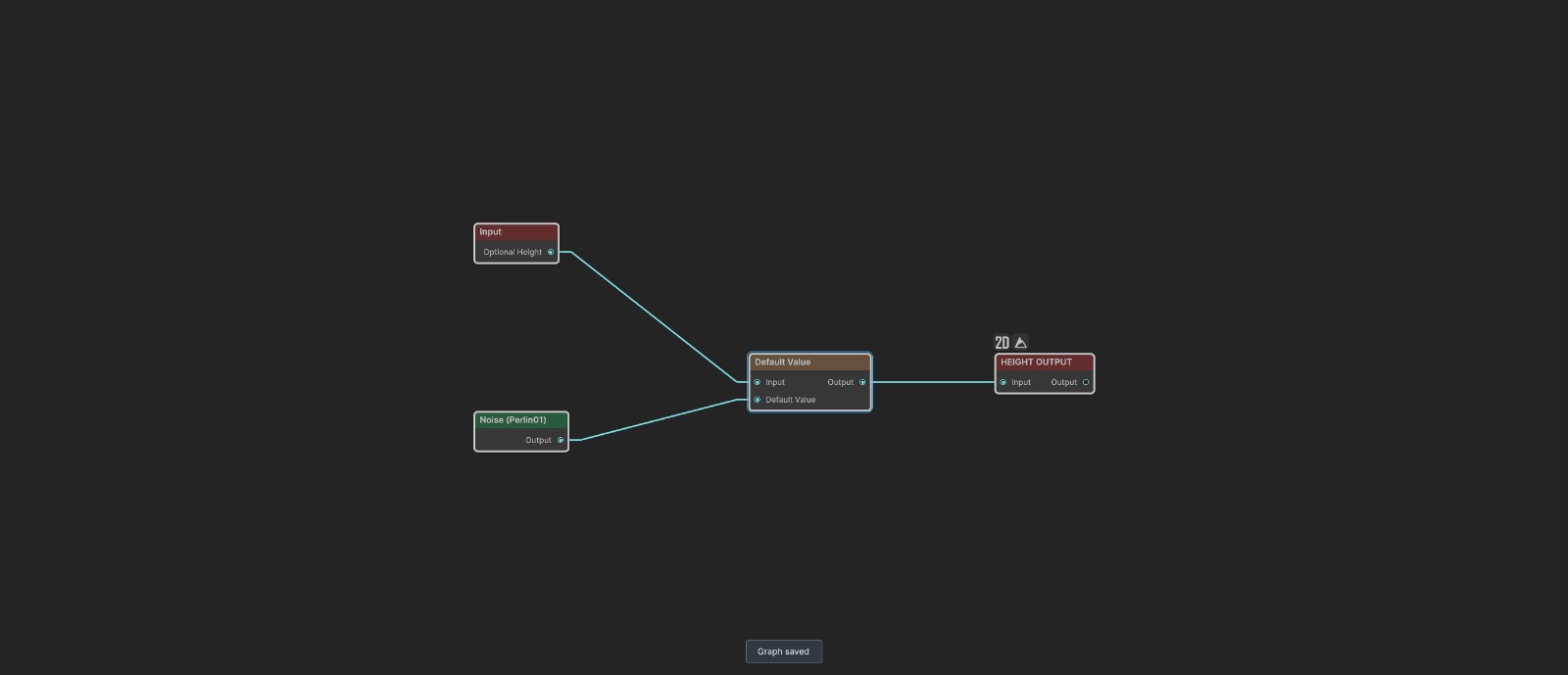
The sample graph has an external mask Input named Optional Height, a 600 meter Noise on Default Value, and Height Output downstream. The external input is not bound in the documentation scene, so the saved graph selects Noise.
Missing Input uses the fallback


Because Optional Height has no texture, Default Value selects the connected 600 meter Noise. The tested height range is about 0.140 to 0.644.
Valid Input takes priority


For this test, a separate 180 meter Noise was connected to Input. Its finer pattern appears unchanged, while the 600 meter fallback is ignored. The temporary source was removed after testing and the optional external Input was restored.
Recipes
- Standalone graph preview: external Input to Input, locally generated Noise or mask to Default Value, then continue the graph from Output.
- Optional biome mask: custom mask Input to Input, Constant Height 1 to Default Value, so the effect covers the whole biome when no mask is supplied.
- Optional spawn positions: set Slot Type to Buffer, external position Input to Input, local Scatter to Default Value, then send Output to an instance output.
- Graph chain fallback: read a named result from an earlier graph through Input, and compute a local replacement on Default Value when that earlier result is absent.
Tip
Name external Input nodes after their purpose, such as Optional Height or Upstream Soil, so the fallback relationship is clear in the graph.
Note
Default Value owns no texture or buffer of its own, so locking the node itself in the 2D viewport can show nothing. Preview a downstream output to inspect the selected resource.
Warning
Changing Slot Type rebuilds every slot and removes incompatible edges. Undo immediately if you change it by mistake.
Performance
Default Value only checks and links resources. It does not process image pixels or copy position samples, so its cost is negligible. Split Execution does not divide any meaningful work over several frames.
Related nodes
- Input: receives external graph data that may need a fallback.
- Combine: mixes two mask or height values instead of selecting one source.
- Append: joins several valid position buffers rather than choosing one.
- Constant Height: supplies a simple full image fallback.
- Noise: supplies a procedural fallback for height or mask data.
For AI agents
- Type name:
DefaultValueNode; node search and graph commands useDefaultValue. - Slots: Input
0, Default Value1, Output100. All three use the selected slot type. - Slot types:
MaskSlot,ColorTextureSlot, orBufferSlotthrough Slot Type. - Input wins whenever
context.GetTextureorcontext.GetBufferreturns a resource. Pixel values and buffer count are not tested. - If Input is null, the node links Default Value. If both are null, Output is invalid.
- Changing Slot Type rebuilds the slots and can remove edges.
- The pass through node owns no preview texture. Inspect a downstream node such as Height Output.
- Bypass ignores Default Value and passes Input only; a missing Input therefore reads as empty.
- Sample graph:
Assets/_DocSamples/NodeGraphs/DefaultValueNode_Doc.asset.