Import From RAW Heightmap
This import reads a RAW heightmap file and remaps its grayscale height values into Polaris terrain elevation. The file is sampled over a user-defined world-space coverage area, then projected onto the destination Polaris terrains that are already present in the scene.
Access point
Open:
GameObject > 3D Object > Polaris > Terrain Wizard
Then go to:
Use Existing Data > RAW Heightmap
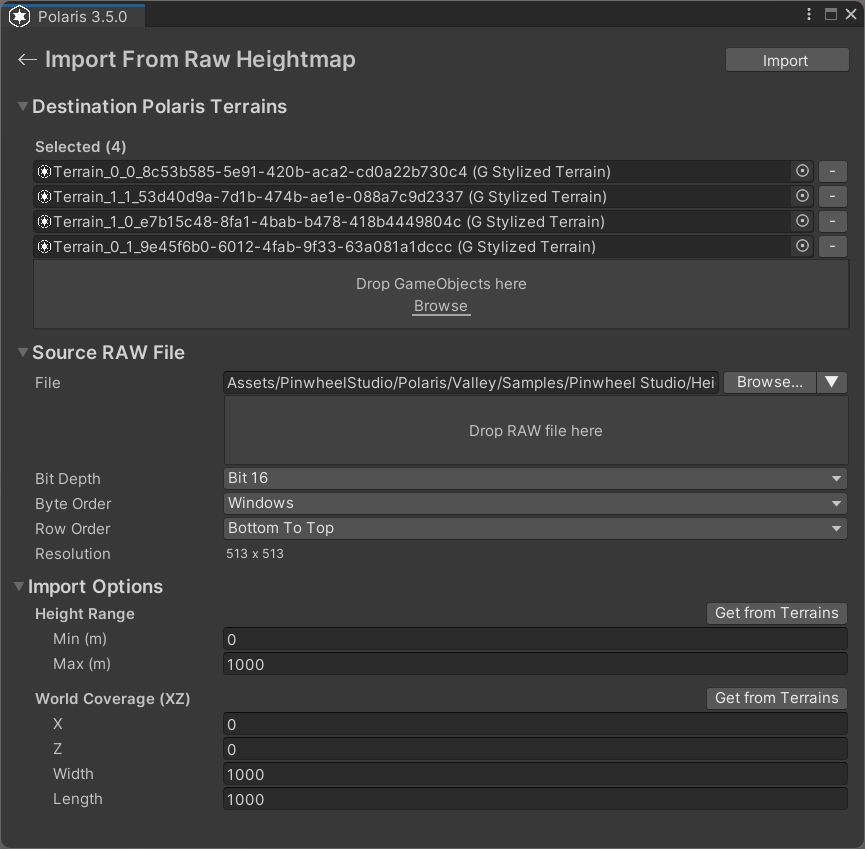
Main parameters
Destination Polaris Terrains
The terrains that will receive the imported height data.
- If the scene has no valid Polaris terrains yet, create them first from the Wizard.
- The selected terrain layout defines the destination coverage.
Source RAW File
The heightmap file to import.
File
The source RAW file path.
- You can browse for a file.
- You can pick from RAW files found in the project.
- You can drag and drop a file directly into the page.
Bit Depth
The height precision of the source file.
- Use 8-bit for
.rawor.r8sources when appropriate. - Use 16-bit for
.r16files.
Byte Order
Used for 16-bit RAW files to match the source application's endian order.
Row Order
Controls whether rows are read top-to-bottom or bottom-to-top.
If the terrain appears vertically flipped, check this setting.
Height Range
Maps the RAW grayscale range into world-space elevation.
Min (m)is the lowest imported height.Max (m)is the highest imported height.Get from Terrainsfills this from the selected destination terrains.
World Coverage (XZ)
Defines the world-space rectangle covered by the RAW file.
XandZdefine the origin.WidthandLengthdefine the covered area.Get from Terrainsfills this from the destination terrain bounds.
Things worth noting
- RAW import only brings in terrain height.
- If your workflow also has color maps or splat maps, import those afterward with the texture set path.
- If the resolution cannot be detected, the source file may not be a square RAW heightmap.
- Incorrect bit depth, byte order, or row order will produce distorted terrain.