How Vista blends biomes
When several biomes affect the same terrain tile, Vista combines them into one final terrain result.
The important idea is simple:
Each biome has a mask, each biome has an order, and each kind of output has its own blend rule.
Biome Mask
The biome mask controls where the biome has influence. It starts from the Local Procedural Biome's anchors: the anchors define the biome area in the scene, and Vista turns that area into the mask used for blending. See Anchors editing for how to edit the biome shape.
In normal editing, you usually experience the mask through the biome's scene handles: the main anchors define the region, and the falloff anchors define how softly the biome fades out near the edge.
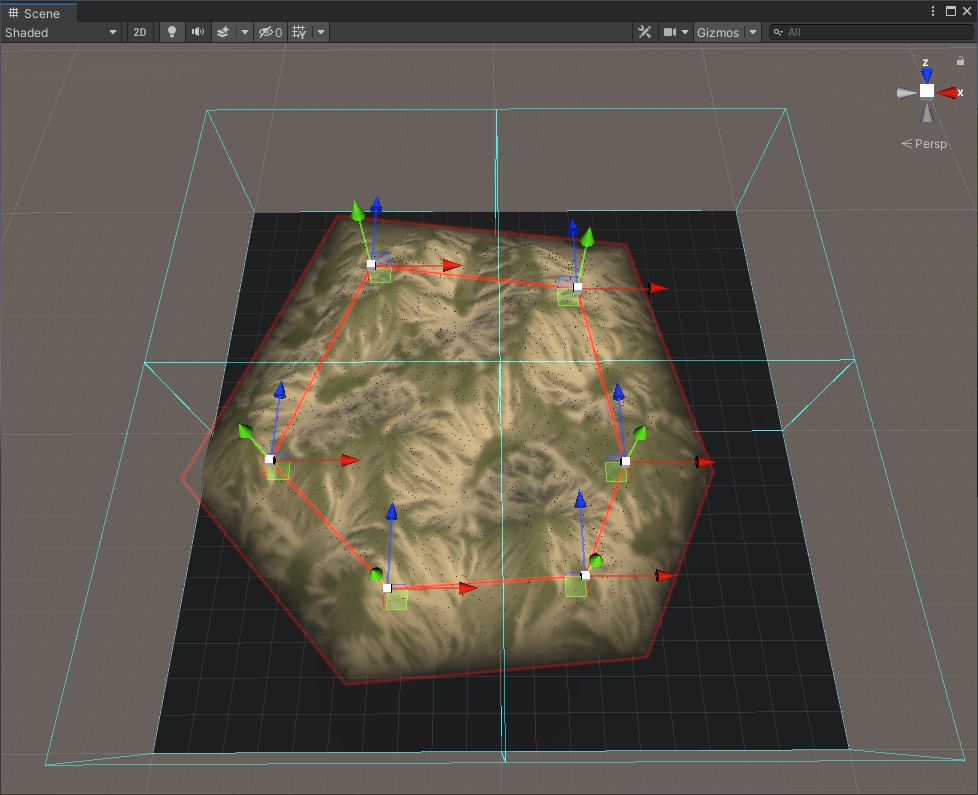
The mask is what lets an oasis, forest patch, cave entrance, or flower patch fade naturally into the surrounding terrain.
After the anchor shape is defined, the mask can also be refined with tools such as hand painting or a Biome Mask Graph. For example, a mask graph can soften the edge, add noise, or reshape the coverage so the transition feels more natural.
Biome Order
Order controls which biome is applied first, second, third, and so on.
For most scenes, arranging biomes in the Unity Hierarchy is the easiest way to manage this order. Put broad biomes near the top, then place smaller or more specific biomes after them.
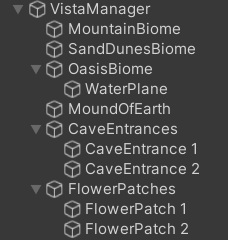
Each Local Procedural Biome also has an Order value in the Inspector. This value has stronger priority than the Hierarchy order. It is useful when a biome needs a specific blend position, but moving it in the Hierarchy would make the scene harder to organize.
A common setup is:
- Base biome first.
- Large regional biomes next.
- Small detail or overlay biomes last.
If two biomes overlap and the result feels wrong, check their order before changing the graph.
Blend Rules
A biome can output different things:
- terrain height
- terrain textures
- holes
- grass and details
- trees
- objects
Each one can blend in a different way.
For example, a cave entrance may add a hole while keeping nearby grass and trees. A flower patch may only add flowers. A dunes biome may place its sand texture only where the dune height is actually visible.
That is why Vista gives separate blend options for height, textures, holes, and population.
What Happens During Blending
Vista blends biomes per terrain tile.
For each tile, Vista first finds the biomes that affect that tile. Then it sorts those biomes by their blend order. After that, each biome creates its terrain data, such as height, textures, holes, grass, trees, or objects.
A biome only contributes the outputs it actually creates. For example, if a biome does not output a height map, it is skipped during height blending. It can still contribute textures, holes, grass, trees, or objects if its graph outputs those data.
Vista then combines those biome results one type at a time. Height is blended with the height rule. Textures are blended with the texture rule. Holes are blended with the hole rule. Population, such as grass, trees, and objects, is blended with the population rule.
After these steps, the tile has one final result that can be applied to the terrain.