Import From Unity Terrain
This import works on terrains that are present in the scene. It supports multi-tile Unity Terrain to multi-tile Polaris transfer, sampling source data in world space and remapping it onto the destination Polaris terrains. Depending on the data type, the result may be reprojected, clamped, or reassigned into Polaris-specific data structures such as prototype groups.
Access point
Open:
GameObject > 3D Object > Polaris > Terrain Wizard
Then go to:
Use Existing Data > Unity Terrain
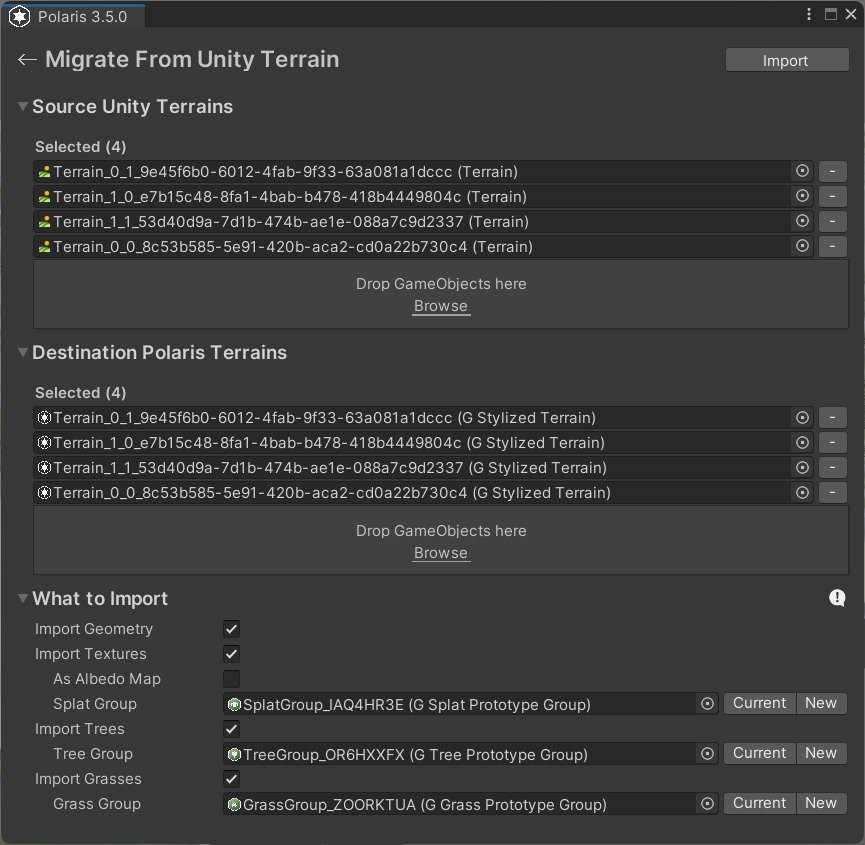
What it can import
- Height Map and Hole Map
- Textures
- Trees
- Grasses
Main parameters
Source Unity Terrains
The Unity Terrain objects to read from.
- Use
Select Allto gather every Unity Terrain in the scene. - You can also add specific terrains manually or by drag and drop.
Destination Polaris Terrains
The Polaris terrains that will receive the imported data.
- If you do not have destination terrains yet, use
Generate Matching Terrains. - Matching generation also creates fresh prototype group assets and assigns them to the new terrains.
Import Geometry
Copies heightmap and hole map data from Unity Terrain into Polaris.
Import Textures
Copies terrain layers and control maps.
As Albedo Map
Bakes the source layers into a single color map instead of keeping them as separate splat layers.
Note
Before using this option, make sure the destination Polaris terrain has an appropriate Albedo Map resolution. If the resolution is too low, the baked result can lose detail and appear blurry after import.
Mip Bias
Used only when importing textures as a baked color map.
- Lower values keep more texture detail.
- Higher values sample blurrier mip levels and reduce high-frequency noise.
Splat Group
The destination splat prototype group.
Currentbutton uses the group already assigned to the destination terrain.Newbutton creates a fresh group asset inAssets/PolarisMigration/.- If no group is assigned, texture-layer import is skipped.
Import Trees
Copies tree prototypes and tree instances.
Tree Group
The destination tree prototype group.
Currentbutton reuses the current group on the destination terrain.Newbutton creates a new group asset.- If no group is assigned, tree import is skipped.
Import Grasses
Copies grass prototypes and grass instances.
Grass Group
The destination grass prototype group.
Currentbutton reuses the current group on the destination terrain.Newbutton creates a new group asset.- If no group is assigned, grass import is skipped.
Things worth noting
- Assigned prototype groups are overwritten during import.
- Importing textures as a color map is different from importing texture layers. The color-map path does not use a splat group.
- After import, the original Unity Terrains may still be active and render on top of the Polaris result.
- Imported content often needs cleanup to better match Polaris's stylized look.