Import From Mesh
This import samples height from one or more mesh objects in the scene, then rebuilds the result as Polaris terrain data. It is useful when your terrain source already exists as mesh geometry and you want to continue editing it inside Polaris.
Access point
Open:
GameObject > 3D Object > Polaris > Terrain Wizard
Then go to:
Use Existing Data > Mesh
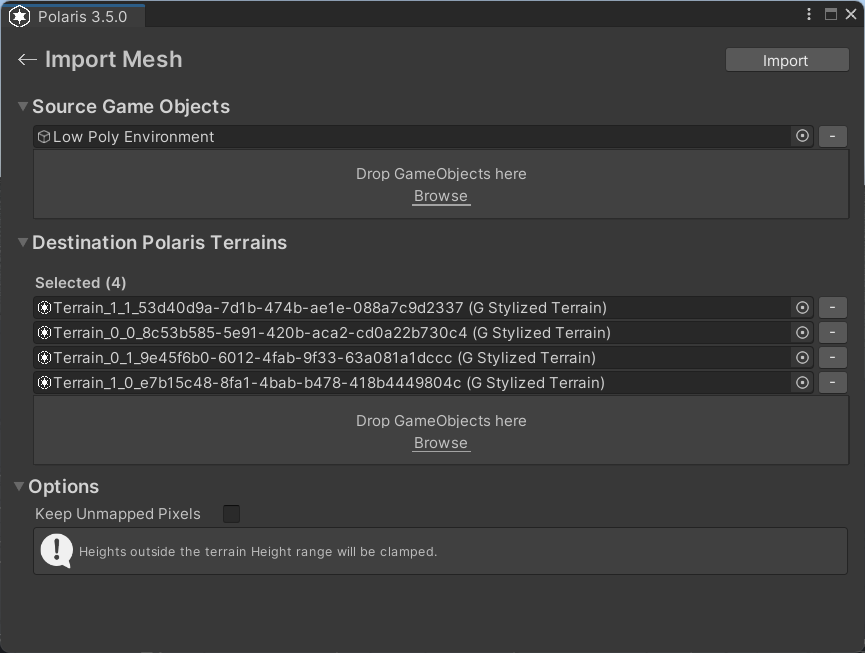
How this import behaves
- The source must be present in the scene as GameObjects with
MeshFiltercomponents. - The destination must already exist as Polaris terrains in the scene.
- The importer samples height from the source meshes and projects that height onto the destination Polaris terrains.
- The result is rebuilt using Polaris geometry engine, not copied as original mesh geometry. Final result is not guaranteed to be 100% identical to source meshes.
Main parameters
Source Game Objects
The root GameObjects that contain the mesh geometry to sample.
- Add roots that contain one or more
MeshFiltercomponents. - The importer scans the full hierarchy under each root.
- You can add multiple roots if the source terrain is split across several objects.
Destination Polaris Terrains
The Polaris terrains that will receive the sampled height result.
- If the scene has no valid Polaris terrains yet, create them first.
- You can select existing terrains manually, use
Select All, or drag and drop scene objects.
Keep Unmapped Pixels
Controls what happens where the source mesh does not cover the destination terrain.
- On: preserve the existing terrain height in uncovered areas.
- Off: reset uncovered areas to flat ground.
Things worth noting
- Mesh import samples height only, then rebuilds the terrain using Polaris terrain data.
- It will not produce a 100% identical copy of the original mesh.
- Heights outside the destination terrain height range are clamped.
- Overhangs, caves, or non-terrain mesh features do not translate cleanly into a heightmap-based terrain result.
- Cleanup is often needed after import, especially when the source mesh contains non-terrain details or the destination terrain layout does not match the source shape closely.