Foliage painter
This tool is used to paint tree and grass instances onto the environment. Go to GameObject>3D Object>Polaris>Paint Tools>Foliage Painter to add one.
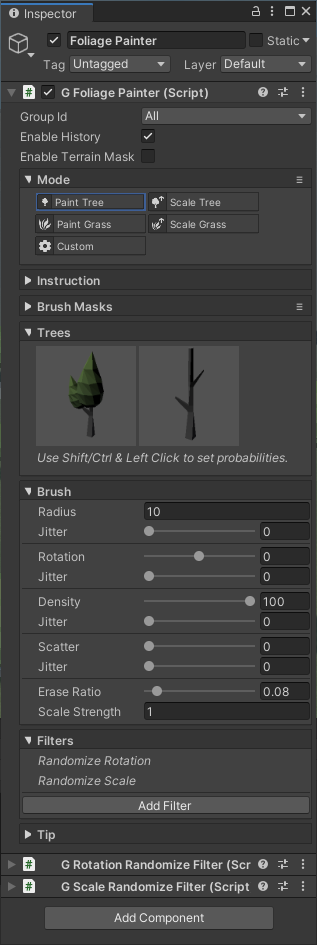
Similar to the Geometry & Texture Painter, this tool consist of several painting modes:
- Paint Tree: paint or erase tree instances.
- Scale Tree: modify tree instance size.
- Paint Grass: paint or erase grass instances.
- Scale Grass: modify grass instances size.
- Custom: other custom functionalities, defined by user code.
For the Trees/Grasses selector to show up, you have to create appropriate prototype group assets and assign it to the terrain. See Create Tree Prototypes Group and Create Grass Prototype Group for more detail.
Foliage Painter has some additional parameters:
- Density: determine how many instances to spawn.
- Erase Ratio: use this multiplier if you just want to snip off trees in an area, not erase them all.
- Scale Strength: strength of the brush in Scale modes.
Initially, painted instances will have default transform properties (rotation of 0 and scale of 1), this will introduce a repetitive pattern. To add some randomness, you can use some filters. To add a filter, click on the Add Filter button and select one of them.
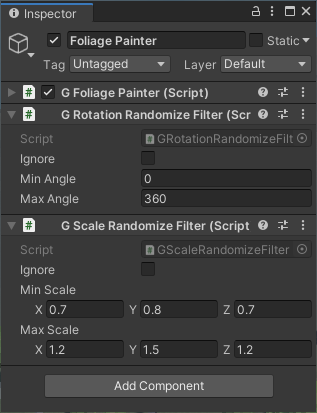
There are several types of filter:
- Height Constraint: prevent the instance from being spawned based on the altitude range.
- Slope Constraint: prevent the instance from being spawned based on surface angle.
- Randomize Rotation: rotate the instance randomly.
- Randomize Scale: scale the instance randomly.
- Clamp Scale: prevent the instance from being too big or too small by clamping its scale.
Randomize Rotation and Randomize Scale filters are automatically added when you create the painter.