Prepare for baking
Mark geometry as static
Before performing baking in the editor (Lightmap baking for example), you have to mark terrain geometry as static. However, game objects which contain geometry mesh are hidden from the Hierarchy to prevent clustering, and you should NOT mark the terrain game object as static, since it also contains other kinds of components like Tree Collider.
To properly mark geometry as static, go to Edit>Project Settings>Polaris>Editor>General, then check on Show Geometry Chunks In Hierarchy. A child game object named ~Geometry will appear under the terrain object, mark it as static then select "Yes, change children".
Nav Mesh baking
Terrain geometry is automatically marked as Navigation Static so it can be grabbed by Unity Navigation System. However, trees rendered with Polaris are not game objects, so Unity doesn't know how to carve holes on the nav mesh for more precise results. Luckily, Polaris provides a helper tool to help you deal with this. Go to GameObject>3D Object>Polaris>Utilities>Navigation Helper to create it.
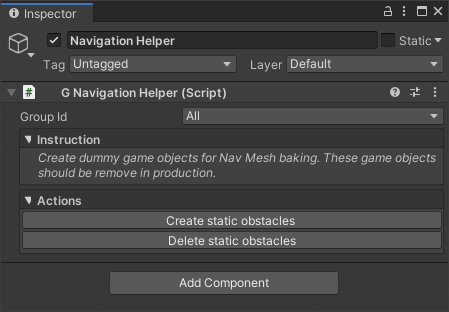
Before baking nav mesh, click on Create static obstacles, it will create some dummy game objects where your trees are, so Unity knows how to carve holes on the nav mesh.
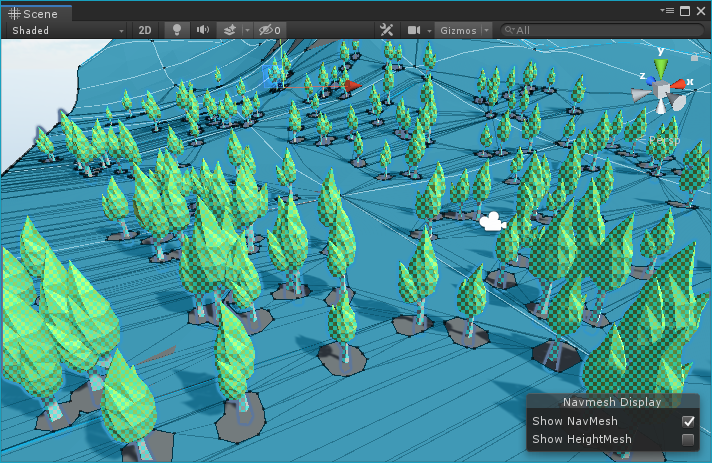
Once you're satisfied with the result, remember to click on Delete static obstacles to delete those dummy game objects.